Retargeting Strategies to Win Back Cart Abandoners
Digital consumers can fill their shopping carts all the way to your ecommerce checkout page and end up not making the purchase.
Cart abandonment sure is frustrating, but this is a common occurrence and a challenge most if not all online retailers face. And that’s where the art and science of cart abandoner retargeting comes into play.
In this guide, we lift the curtain on the top reasons behind shopping cart abandonment, prevention, and strategic solutions to win them back and increase your conversion rates.
Key Takeaways
High Costs: Hidden costs like shipping and taxes surprise shoppers at checkout.
Lack of Purchase Intent: Many users browse without the intention to buy.
Complicated Checkout Process: Lengthy or confusing steps deter users.
Limited Payment Options: Shoppers leave when their preferred payment method isn’t available.
Security Concerns: Lack of trust in website security leads to cart abandonment.
Cart Abandonment: Why Shoppers Abandon Their Carts
Online consumers abandon their shopping carts for a variety of reasons, but mostly due to the following:
Reason
Percentage
Strategic Approach
Extra Costs (Shipping/Tax)
48%
Offer transparent pricing, free shipping options
Mandatory Account Creation
26%
Provide guest checkout, simplified registration
Payment Security Concerns
25%
Highlight secure payment gateways, trust badges
Slow Delivery Speed
23%
Communicate fast shipping, provide delivery estimates
Complex Checkout Process
22%
Streamline checkout, reduce steps, improve UX
Unclear Total Order Cost
21%
Display complete pricing upfront, cost calculator
Unsatisfactory Returns Policy
18%
Offer flexible, clear return guidelines
Limited Payment Methods
13%
Integrate multiple payment options
Credit Card Declined
9%
Provide payment troubleshooting, alternative methods
Caught Off Guard with High Costs
It’s a real mood killer when shoppers find the perfect item only to see the price shoot up at checkout.
Think: shipping costs, taxes, or other unexpected charges. As a result, online shoppers leave their carts behind and find a better deal elsewhere.
Not Intent to Buy Anything Yet
Just because they made it to the latter stage of the sales funnel doesn’t mean they’re in fact in a buying mode. A lot of people browse through online stores just to window shop.
They may still be under the process of comparing prices, saving items, checking for possible discounts, or simply exploring what’s out there.
Checkout Process is Complicated
When faced with too many steps, endless forms to fill out, or confusing navigation structure, it’s a major turn-off for your online shoppers. And a surefire way to ditch their carts.
Payment Options Available are Limited
Some people have preferred methods of payment. Whether it’s PayPal, a specific credit card, or another digital wallet. They might just leave their carts if their payment preference isn’t in the options. As simple as that.
Consider offering a variety of payment options for convenience and security among your potential customers. Accommodating different payment preferences will doubtless help complete the sale.
Creating an Account is Required
Requiring shoppers to create an account before they can complete a purchase? Another common reason for abandoned shopping carts.
Sure, account features like order tracking and personalised recommendations are great. But many customers find it an unnecessary hassle especially if they’re in a hurry or making a one-time purchase.
Doubts about the Website’s Security
Digital consumers are smart and savvy. Not to mention increasingly wary of site security red flags. If your e-commerce website doesn’t look trustworthy, customers may hesitate to enter their payment details and abandon their carts.
Top Abandoned Cart Retargeting Strategies
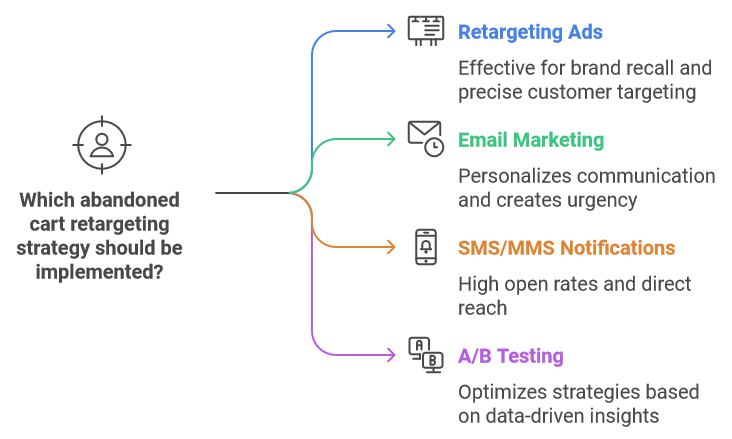
Reminding shoppers about their ‘unfinished business’ on the checkout page, and by extension prompting them to make a purchase, can be achieved through the following:
Run Effective Retargeting Ads
One of the most ideal ways to re-engage with cart abandoners is running remarketing ads.
You can run it through Google search or social media platforms such as Facebook and Instagram.
Reasons Why they Work:
You can precisely retarget customers who previously interacted with your site but didn’t convert.
It keeps your business top-of-mind. They’re more likely to remember your brand first when they’re finally ready to buy.
Dynamic retargeting, or showing previously-checked products to your basket abandoners, is a personalised approach to give them that extra nudge to finalise a purchasing decision.
By displaying an ad of the exact item in their cart, you’re reminding them of their abandoned baskets.
It’s a psychological tactic that jogs their memory and reignites interest in the product they discovered through your site.
Leverage Abandoned Cart Email Marketing
If they provided their email address prior to leaving, it’s wise to run a cart abandonment email campaign for re-engagement.
Personalisation is a key sales driver here.
Aside from simply mentioning the user’s first name both in the subject line and in the opening email, show them recommended items that they’d be interested to check out.
Utilise the scarcity principle by displaying limited-edition products to appeal to your customer’s fear of missing out. This cart email best practice creates a sense of urgency.
Now timing is an equally essential aspect of your warm email retargeting strategy.
How to do it?
Schedule three emails to send to your cart deserters as follows:
Email #1: send your very first email within 30 minutes to an hour after the basket abandonment happened. Customers may have already bought a similar product if you wait for hours to days before sending it.
Let’s give you an example:
Subject line: Hey John, Your Items Are Waiting for You!
Hi John,
We noticed you left a few items in your cart. We just wanted to make sure you didn’t miss out on them! Your selected products are still waiting for you and won’t be here forever.
To make things easier, simply click the button below to complete your purchase:
[Complete My Purchase]
If you have any questions or need assistance, we’re here to help! 🙌
Best regards,
…
If they didn’t respond or act upon your 1st email, send your 2nd follow-up email after 24 hours. Then the 3rd and final email after 72 hours.
This is a more balanced approach. Since you don’t want your warm prospect to experience retargeting fatigue.
At the same time, you don’t want to miss out on the opportunity of possibly winning over a customer who will convert. Persistence is key here.
Consider SMS, MMS, or Push Notification Remarketing
Ecommerce businesses should highly consider SMS marketing to directly reach and retarget lost customers who didn’t initially convert.
To diversify your abandoned cart recovery strategies, running an MMS campaign, while a bit more expensive, can likewise help better advertise and showcase your brand through visual media.
Meanwhile, push notifications have a low open rate at a measly 4%. But only because recipients can already see them, being reminded of their pending purchases without having to click on the notification.
If a customer ended up completing a purchase a day or two after receiving a push notif, it’s not unlikely that it was at least partly influenced by it.
A/B Test and Optimise your Retargeting Strategy
Which of your strategies for abandoned cart recovery are actually working, and which one needs more improving?
Take advantage of AI and automation tools to track and optimise your retargeting campaigns. Check your performance stats and make data-driven decisions to maximise your results and impact.
Key elements to A/B test include:
Ad copy: Test different headlines and descriptions to see which messaging resonates best.
Call-to-action: Experiment with various CTAs to determine which prompts more clicks.
Visuals: Compare images, videos, and graphics to find the most engaging visual content.
Ad format: Try different formats like carousel, single image, and video ads to see which performs better.
Special offers: Consider varying offers to identify the most effective incentive (i.e., free shipping, utilising discount codes).
Ad placement: Evaluate performance across different platforms (e.g., Google, Facebook, Instagram) and ad placements (e.g., feed, stories).
Timing: Experiment with different times of day or days of the week to find the optimal ad schedule.
Frequency capping: Adjust the frequency of ad displays to balance exposure and avoid ad fatigue.
There are plenty of strategies you can use to prevent lost sales and reduce shopping cart abandonment rate. It all boils down to the following.
Make the checkout process as easy and quick as possible for customers to complete the transaction. Accommodate different payment preferences. Minimise the number of steps and forms they have to fill out. Offering a guest checkout option can save tremendous time for those who don’t want to create an account.
Build trust with your customers. Reassure them that their payment information is safe by displaying security badges and clear privacy policies. Highlight social proof or Google reviews from satisfied clients, be it on your website or email campaigns.
Enable features that let customers save their carts or add items to a wish list. This way, they can easily return to their intended purchases later without starting from scratch. Send gentle email reminders or notifications about their saved items to entice them to complete their purchase whenever they’re ready.
Ensure customers can get help if they encounter any issues. Offer support channels, such as live chat or email support. Swift and helpful responses can prevent cart abandonment, especially if customers have questions or concerns during checkout.
Digital buyers want a user-friendly interface, fast loading times, and easily navigable pages to have an overall positive digital shopping experience. Focus on these areas to lessen cart abandonment and increase conversions.
Recover Abandoned Carts With Domain Bird’s Remarketing Experts
Need a professional digital advertising marketer to run your retargeting campaigns?
Domain Bird is a Google-Partner certified PPC agency with a proven track record of delivering profitable client results.
For more information about what we can do and how we do it with a tailored approach for every business, book a consultation for a FREE campaign audit.
Get in touch with one of our dedicated marketing experts today!
Working with a trusted full service digital marketing agency Australia has to give can help you hit your two main targets: getting your business found online and increasing your profitability.
Get in touch with us. We’ll tell you how it’s done.
The Role of Artificial Intelligence in Shaping the Future of SEO
Billions of people go to Google and other search engines to find solutions to their problems. As they research, they’re led to different pages with various contents.
But what people don’t realise is that there are plenty of AI tools working in the backend, determining what type of content to show or not show.
Search engines use AI tools to help users get to the right content at the right time.
And as AI algorithms expand, they can develop even greater competence in learning user intent, leading to more accurate results. This is a necessary transition to incorporate into your SEO techniques to keep up with the advancements of a fast-changing market.
Now, do you see the future of SEO with AI?
Key Takeaways
AI’s Role in SEO: AI tools play a crucial role in shaping search engine algorithms, improving search accuracy, and delivering content that aligns with user intent.
Historical and Current Context: AI has evolved from simple keyword-based algorithms like Google’s PageRank to advanced systems like RankBrain, which leverage natural language processing (NLP) for understanding user intent more deeply.
Benefits of AI in SEO: Enhanced search accuracy due to better understanding of semantic queries. Automation of routine tasks like data analysis and keyword research, increasing efficiency and reducing human effort.
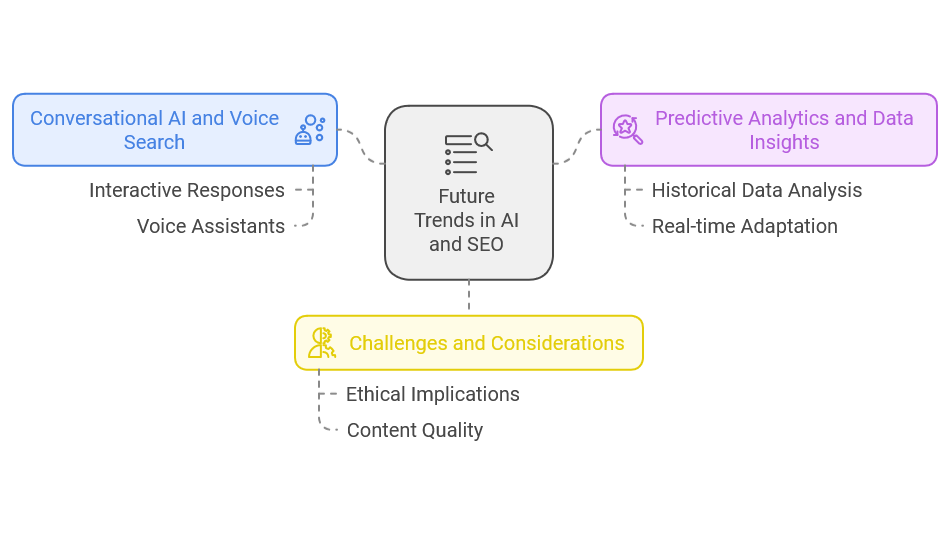
Future SEO Trends: The rise of conversational AI and voice search demands optimization for more interactive, query-specific content. Predictive analytics and data insights will enable more refined, adaptive SEO campaigns, keeping pace with changing algorithms and user behaviour.
The Evolution of AI in SEO
Historical Context
AI and search engines go way back from the earliest usage of algorithms to top search results based on keywords.
The decade was the ’90s, when Google’s PageRank algorithm was developed, highlighting a crucial milestone for search engines.
As artificial intelligence advances, machine-learning techniques are integrated into search engines to grasp user queries and provide answers more accurately.
As of late, there are plenty of AI-driven systems such as RankBrain that offer more precise searches, analysing the intentions behind phrases that are keyed in by the users rather than just aligning keywords.
These AI-driven methodologies can uncover semantic phrases easily missed by traditional keyword research methods, delivering convenient and personalised search experiences.
Current Applications of AI in SEO
AI technologies power up search algorithms. Natural language processing and machine learning are employed to read large and complex data. By factoring user intent and behaviour, the search outcomes are greatly improved.
AI tools like BrightEdge, SEMrush and Surfer SEO are also leveraged to enhance SEO. These programmes can provide recommendations and guide content creators in crafting and marketing SEO-friendly content. They have built-in features like real-time data analysis and keyword-racking, allowing robust research for SEO optimisation.
Key Benefits of AI in SEO
Making strides from traditional SEO practises, AI encompasses real-time data analytics and personalised user experience.
From more structured articles to relevant keywords, here’s what it means to have AI in SEO:
Improved Search Accuracy and Relevance
Incorporating AI into search engines leads to profound search results. How so? Because AI does not rely on keywords to search. It uses natural language processing, which enhances the search performance.
NLP dives deep to understand user intent and behaviour instead of just matching keywords and identifying related terms and concepts. This allows it to produce more accurate and relevant search outcomes.
Automation and Efficiency
AI is lightning-quick. It can process, analyse and research data faster than you can blink with little human intervention.
AI-driven tools can streamline routine SEO tasks such as keyword research, data analysis and content optimisation. These programmes can search for trends, optimise content and track performance, freeing you and your SEO professional to work on strategic projects without compromising efficiency and accuracy.
Balancing Human Expertise and AI
Will AI replace humans in the workplace? Well, bots are not supposed to displace humans; they’re supposed to balance each other out to create a collaborative intelligence to make better work and strategic decisions.
The Human Element in Content Creation
Yes, AI can process vast amounts of data and give answers to questions in seconds. But what AI lacks is the human touch. AI models don’t have the emotional intelligence and nuances to comprehend complex patterns in a dynamic environment.
When you’re creating content that resonates with your audience, you need more than just speed and precision but deep awareness of human desires.
These are qualities that remain exclusive to real people. They have the creativity and understanding that gives them unique perspectives on content that aligns with customer needs and your business goals.
You can use Al to optimise your content or conduct keyword research. These tools can speed up your writing process while you incorporate creativity and emotional acumen to shape the article. This makes your content more authentic and in sync with your brand.
Simply put, you’re collectively using the strengths of AI automation and human touch to enhance your content.
Adapting SEO Strategies for the AI Era
Bots are getting smarter, and they’re reshaping the digital landscape. In response, your SEO strategies must also evolve, so you can stay ahead in an AI-driven era.
Here’s what the future of SEO with AI entails:
Embracing AI-Powered Tools
AI-powered tools open an opportunity to enhance your search engine optimisation efforts. AIs provide a variety of functions for keyword research or performance tracking, allowing you to build content perfectly tailored to a specific market.
Some of the most popular AI-driven tools leveraged for SEO are as follows:
To integrate these tools into existing SEO workflows successfully, you can follow the steps below:
Evaluate your existing SEO workflow and determine which areas AI is beneficial.
Leverage the most appropriate AI tool for the task and make sure it suits your budget and desired SEO outcome.
Train your team and ensure they are proficient in using the new AI tool.
Monitor performance and improvements and adjust accordingly based on collected insights.
Continue to refine your strategies to achieve the best results.
Focusing on User Intent and Personalisation
Why do user intent and personalisation matter when it comes to SEO? Because it is useful in creating relevant content. If you want to entice quality leads using SEO, you need to improve your content to match the search intent.
AI tools can be leveraged to analyse user intent. Through NLP, you can grasp the meaning behind every search term. Meanwhile, machine learning algorithms can monitor consumer behaviour, engagement, needs and preferences.
AI can cluster users based on intent, leading to more focused content and strategies.
Future Trends in AI and SEO
Here’s a futuristic look at the trends of AI and SEO:
The Rise of Conversational AI and Voice Search
Conversational AIs are more interactive; thus, they can give precise answers directly to anyone looking for information.
People use voice assistants to order food or shop for presents online, making specific searches.
You can take advantage of this by optimising your page and crafting more conversational content for a more engaging experience.
Predictive Analytics and Data Insights
Predictive analysis offers insights into what SEO campaigns can yield the best results simply by examining past data. Looking at historical records, you can refine areas that might fall short in real-time.
Data insights can help improve your campaigns, adapting them continuously to the evolving search behaviours and algorithm changes. This is important as these tweaks can impact your online presence.
Challenges and Considerations
As AI continues to impact our lives in so many ways, the inclusion of AI in content creation is becoming widespread. Everybody uses smart bots to connect with their audience and drive results.
However, we’re dealing with machines that rely on data. Of course, there are challenges and considerations to value in creating content with AI.
Ethical Implications of AI in Content Creation
AI can create an article in less than a minute. But since AIs don’t have personal experiences to grapple with, the content lacks human touch and nuances.
Bias and fairness are the major ethical problems associated with AI-generated content. These tools are fed with initial data sets. Without training algorithms, it cannot produce the right decision given the constraints.
Over-reliance on automated content generation diminishes the quality of your content. It lacks the depth and creativity to engage your consumers for a more meaningful experience.
Staying Ahead in a Rapidly Changing Landscape
To stay competitive in an AI-driven world, proactively engage. Participate in AI-related meetups, network with experts and stay updated with emerging AI technology.
Proceed to leverage AI tools and adapt your strategies to search engine algorithms.
Continuous learning is critical. It offers greater understanding and answers you’ve never seen before.
So, learn from experts and AI courses. Develop skills to cater to the evolving AI technology by participating in training programmes and probing AI tools.
Being driven to learn is central to improving search engine performance and user experience.
Conclusion
So, what about the future of SEO with AI?
Well, it looks promising.
AI models keep SEO professionals effective by diving deep into user intent and encouraging personalisation. As it continues to evolve, it becomes pivotal for humans to train AIs so that SEO technique stays intersected with user intent.
Looking into the future, AI will continue to shape SEO strategies. Therefore, it will become crucial for organisations to embrace AI advancement while valuing human creativity and expertise.
Working with a trusted full service digital marketing agency Australia has to give can help you hit your two main targets: getting your business found online and increasing your profitability.
Get in touch with us. We’ll tell you how it’s done.
Keyword Cannibalisation Can Ruin Your Search Rankings. Here’s How to Fix That
Your website’s packed with quality content, and you’re doing everything right to boost your rankings in the search engine results pages.
But something’s off. Your pages aren’t performing as well as they should be.
Enter keyword cannibalisation – a relatively common issue even experienced SEOs commit, which can wreak havoc on your organic search marketing strategy.
Key Takeaways
Understanding Keyword Cannibalization: Keyword cannibalization happens when multiple pages on a website target the same or very similar keywords, often confusing search engines and weakening overall SEO.
Negative Impacts of Cannibalization: Cannibalization leads to competing pages, reduced ranking strength, split authority across backlinks, and lower click-through rates. Search engines may struggle to determine the most relevant page, which lowers overall rankings and limits opportunities to target unique keywords.
Distinguishing Keyword Cannibalization: Pages targeting different user intents, distinct subtopics, non-competitive keywords, or geographic-specific content are not considered cannibalization, even if they use similar keywords.
Noindex Tags for Low-Priority Pages: Using noindex tags on lower-priority pages removes them from search results without deleting them, preventing competition with other pages.
Using Content Clusters: Organizing content into clusters with a central pillar page and related subtopic pages helps prevent cannibalization by clarifying content hierarchy and intent.
Working with an SEO Professional: SEO specialists, like Domain Bird, streamline keyword management, avoid SEO pitfalls, and align strategies with broader business goals.
What is Keyword Cannibalisation?
Keyword cannibalisation occurs when multiple pages on your website target the same or very similar keywords.
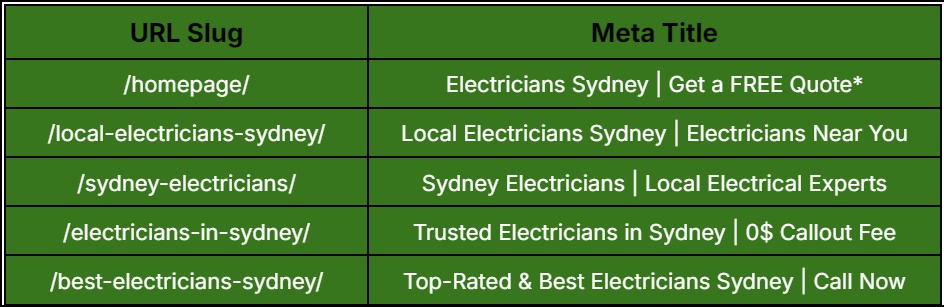
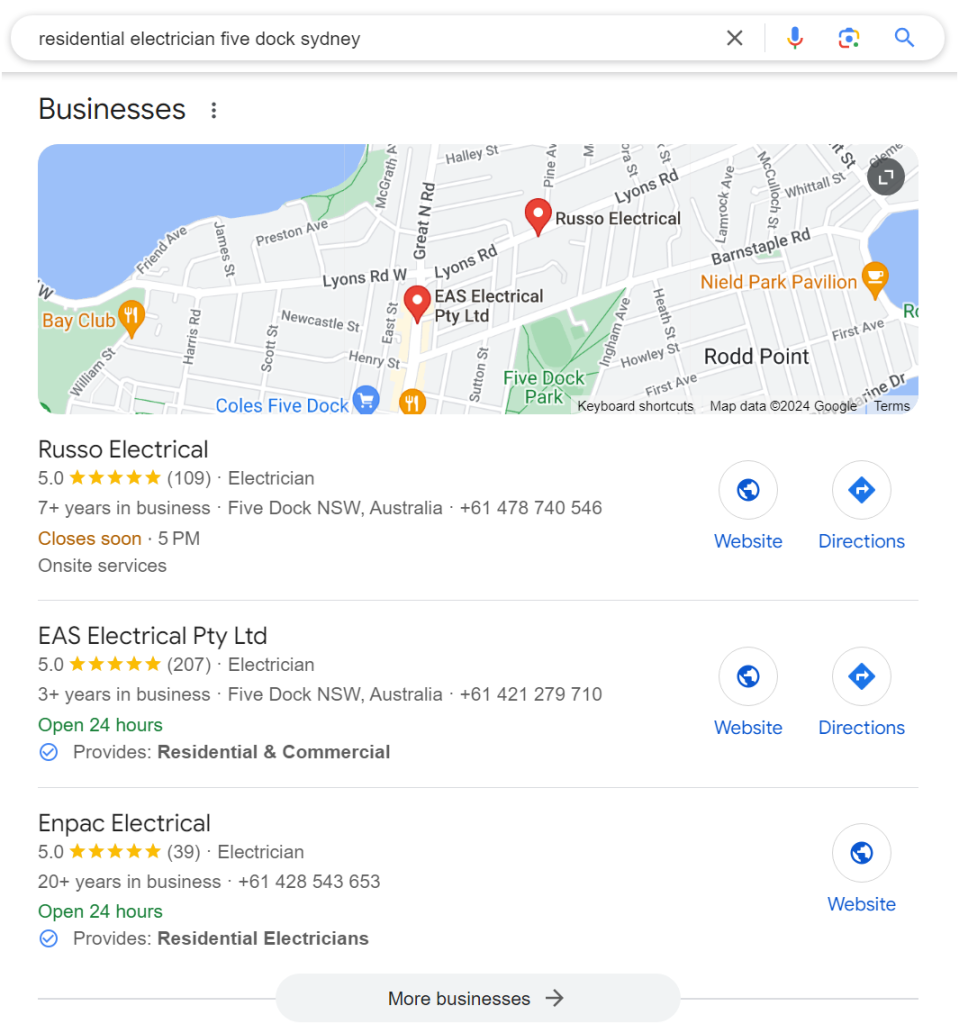
See this example below for a local electrical company’s website pages.
All of these pages target the same keyword with a slight variation, but nevertheless satisfies the same commercial intent – people searching for any of these keywords are looking for local electricians.
They can all be used in the homepage instead of creating individual pages for each search term, which is the perfect recipe for keyword cannibalism.
While it might seem like covering all bases, it actually confuses search engines and can dilute your content’s effectiveness. Here are more insights to consider:
Competing Pages. When you have several optimised category pages for the same keyword, they start competing against each other in search engine rankings. Instead of one strong page, you end up with multiple weaker ones.
Split Authority. The authority and backlinks that could have strengthened a single page are spread across several. It reduces the overall impact and ranking potential of each.
Lower Click-Through Rates (CTR). If your pages are competing in the search engine results, there’s a chance they’ll appear lower in the rankings. This can lead to a drop in CTR. Users are more likely to click on higher-ranked pages.
Confused Search Engines. Search engine bots struggle to determine which page is the most relevant to a particular keyword, which may result in neither page ranking as high as it could.
Missed Opportunities. Instead of diversifying your keyword strategy, you’re essentially putting all your eggs in one basket. It limits your chances of capturing a wider audience through varied search queries.
While keyword cannibalisation splits Google rankings when two or more pages rank for the same keyword, the former is a black-hat tactic involving the unnatural and often excessive usage of a target keyword within a content.
Both misuse the value of keywords and must be avoided at all costs.
What is NOT Considered a Keyword Cannibalisation
While a keyword cannibalization problem can negatively impact your SEO, it’s equally important to distinguish between genuine issues and common misconceptions.
Here’s what typically does not qualify as keyword cannibalisation, and therefore nothing to worry much about:
Different Search Intent
When different pages on your site target similar keywords but address distinct search intents, it’s not considered cannibalisation.
Remember that for it to be considered as such, two or more pages must be targeting the same keyword with a similar intent.
For instance, a blog post about ‘DIY home repairs’ and a service page about ‘professional home repair services’ may both target, at least in part, related keywords. But they cater to different user needs.
The former has purely an informational intent, while the latter is commercial. The searcher is looking for businesses or professionals they can later hire.
Differentiating content based on user intent helps avoid internal competition and enhances overall site relevancy.
Distinct Topics or Subtopics
Keyword overlap is not an issue if your pages focus on different aspects of a broader topic.
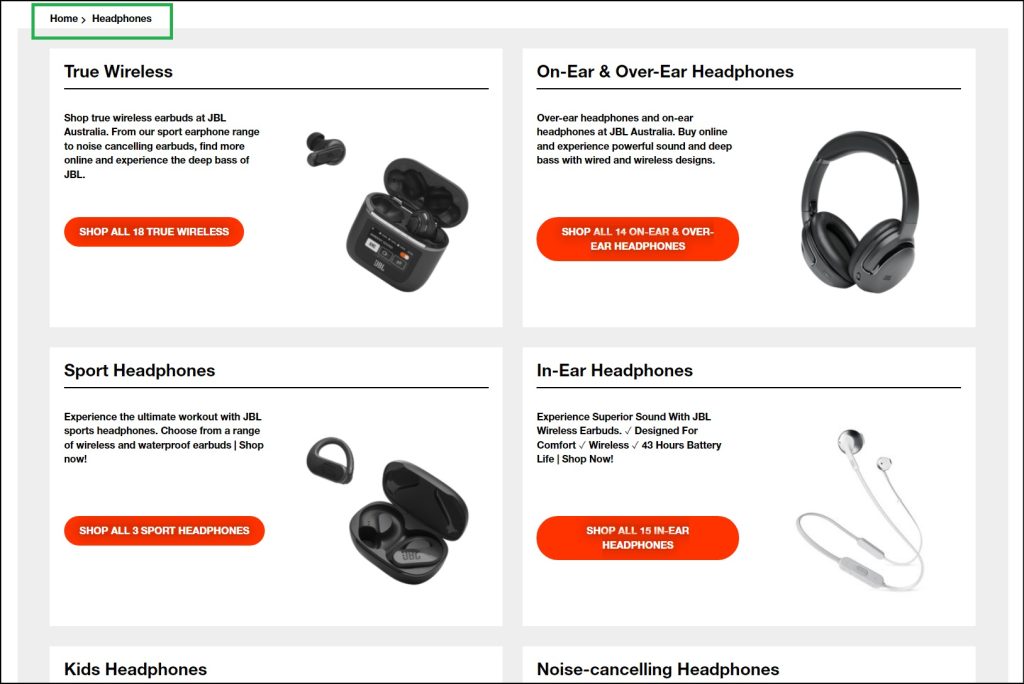
For example, you have a product page for ‘headphones’ in your ecommerce store.
You can create subpages or categories for ‘wireless,’ ‘noise-cancelling,’ and ‘sports’ versions without cannibalising the main page.
See this page from JBL Australia.
However, you may run the risk of ranking your main category page for specific keywords that should have been awarded to your sub-pages.
Content creation plays a major role here to avoid making cannibal pages.
If you want to rank your ‘wireless headphone’ page for that exact keyword, make sure it has a dedicated page with sufficient product descriptions and other relevant information.
Having thin content for that subpage gives Google the impression that it’s not that important of a page after all.
Another tactic you can use is internal linking. Write a blog about noise-cancelling headphones and make sure to link it to its product page using a descriptive anchor text.
Make sure it’s optimised for on-page SEO. That is, the target keyword must be mentioned in the headings, URL slug, and product listing.
Non-Competitive Keywords
Pages targeting keywords with low competition or very niche queries usually don’t suffer from keyword cannibalisation.
When the keywords are not highly competitive, the risk of multiple pages competing for the same position is minimal at best.
In such cases, internal overlap is less likely to impact overall search performance considerably.
Geographically Targeted Content
If your site includes content tailored to different geographic locations, it’s not considered keyword cannibalisation.
A page targeting ‘plumbers Sydney’ and another for ‘plumbers Melbourne’ are addressing separate markets.
Here’s the locations page for A One Korean Painting, where it has individual pages for different areas they cater within Sydney.
Geographic targeting helps serve relevant content to local audiences without causing internal keyword conflicts.
How to Spot Keyword Cannibalism in Your Content
Identify and rectify cannibalised keywords using two main methods:
Google Search Console and Google Analytics
Both Google Search Console and Google Analytics give you a clear view of how your pages are performing in SERP.
You can study the data found through these free keyword tracking tools to spot which search queries are causing internal competition.
By extension, identify pages that might be overlapping in their target keywords.
Manual Site Searching
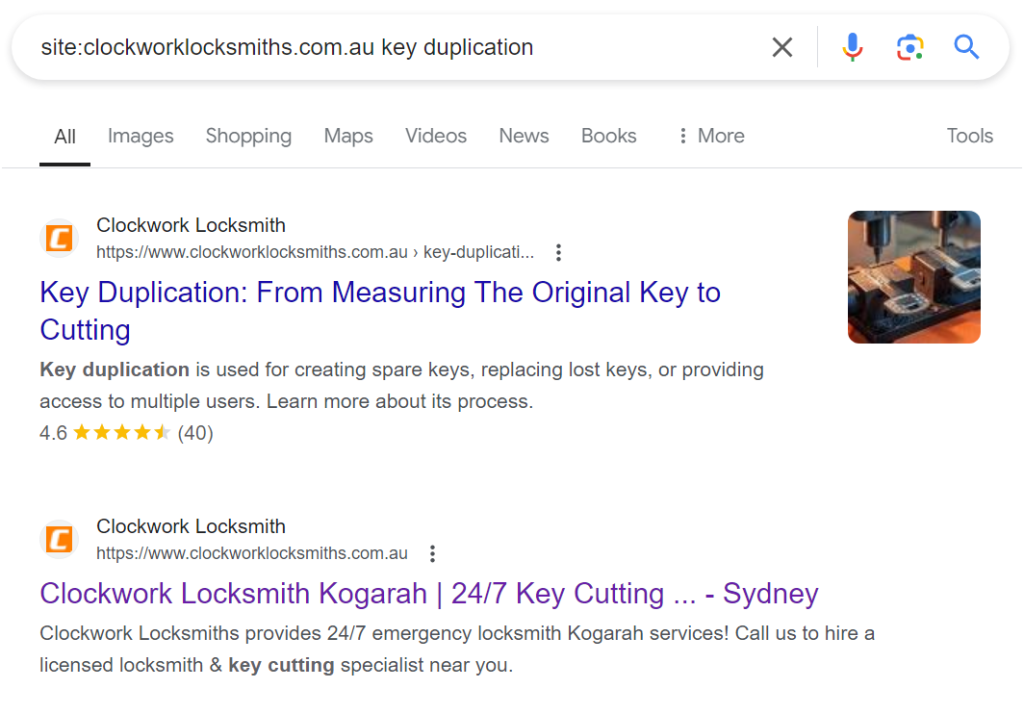
A simple and easy way to identify keyword cannibalization is doing a manual site search.
You can do this by typing in site:[homepage-url] + keyword. See illustration below.
The search results help you see a list of content related to the main keyword and find potential issues.
Do this whenever you’re creating new content. This way, you can avoid cannibalising an existing page and risk a Google ranking drop as a result.
Disclaimer: This search operator may not generate all results related to the query. But it’s a good starting point. A great alternative would be doing a manual search through your CMS platform for potential cannibalisation issues.
How to Fix Keyword Cannibalization Issues
Once you’re able to spot the issues, and find them to be genuine cannibalised contents, it’s time to make the necessary fixes and nip them in the bud.
Redirects
One of the most straightforward fixes is using 301 redirects. When you have multiple pages competing for the same keyword, consider merging the content into a single, more comprehensive page.
Then, set up a 301 redirect from the outdated or less relevant pages to the newly optimised one.
This not only consolidates your content but also ensures any backlinks pointing to the old pages now benefit the new page, boosting its authority and ranking potential.
Canonical Tags
Canonical tags are a powerful tool in signalling to search engines which version of a page should be considered the primary one.
If you have similar pages that are necessary for your website but you don’t want them to compete against each other, you can use the canonicalisation method.
This tag tells Google search to treat one page as the authoritative source while still allowing the other pages to exist.
It’s an effective way to manage duplicate or near-duplicate content without sacrificing valuable keyword optimisation.
Content Optimisation
Internal linking plays a significant role in how search engines understand your website’s structure.
To fix keyword cannibalisation, ensure your internal links are pointing to the most relevant page for a particular keyword. It tells search engines which page you consider most important for that keyword, helping it rank better.
Additionally, revisit the content of your competing pages. Consider updating, combining, or differentiating the content to make each page unique and focused on different, related keywords.
This approach reduces competition between your pages and broadens your keyword reach.
Noindex Tags
For pages that are essential for user experience but not for search engine ranking—like certain landing pages or duplicates of other content—you can use a noindex tag.
This tag tells search engines not to include these pages in their search index, effectively removing them from competition without necessarily deleting them.
It’s a clean way to keep your website organised and user-friendly while ensuring your key pages have the best chance to rank higher.
How to Prevent Keyword Cannibalisation
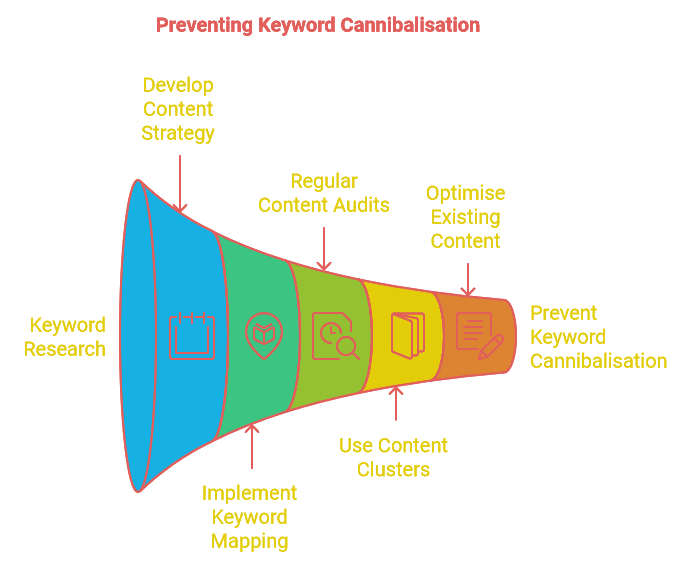
Preventing keyword cannibalisation starts with a strategic approach to content creation and SEO.
Here’s how you can keep your website from falling into this trap:
Conduct Thorough Keyword Research
Before creating new content, perform comprehensive keyword research to understand which terms are most relevant to your audience and where there might be gaps.
Use tools like Google Keyword Planner or SEMrush to identify unique keywords and phrases that haven’t been covered yet. It helps ensure each piece of content targets distinct search queries and reduce the risk of overlap.
Develop a Content Strategy
Create a content strategy that maps out the topics and keywords for each page. Develop a content calendar to make sure you’re not duplicating efforts and to maintain a clear focus on different aspects of your niche.
A well-organised content tactic helps keep your pages targeted and eliminates the chances of keyword cannibalization.
Implement a Keyword Mapping System
Keyword mapping involves assigning specific keywords to individual pages. By clearly defining which keywords each page will target, you can avoid multiple pages vying for the same terms.
Maintain a spreadsheet or use SEO tools to track keyword assignments and ensure that new content doesn’t overlap with existing pages.
Regularly Review and Audit Content
Regular audits of your website’s content can help you spot and rectify keyword cannibalisation issues before they escalate.
Periodically review your pages to identify any that might be competing for the same keywords. This enables you to make necessary adjustments, such as merging similar content or updating keywords, to maintain clear focus across your site.
Use Content Clusters
Organise your content into clusters, with a central ‘pillar’ page that covers a broad topic and multiple ‘cluster’ pages that delve into specific subtopics.
This approach helps establish a clear hierarchy and ensures that each page targets a different aspect of the broader topic.
It also strengthens the relevancy and authority of your pillar page, as related content links back to it.
Optimise and Update Existing Content
As your site evolves, continuously optimise and update your existing content so they remain relevant and effective.
If you notice that multiple pages are ranking for similar keywords, revise them to address different angles or aspects of the topic. This keeps your content fresh and relevant while avoiding cannibalization.
Maintain Clear URL Structures
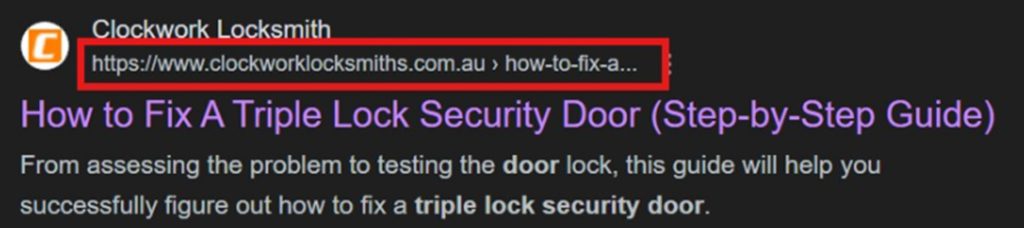
Use a logical and organised URL structure to help search engines and users navigate your site. Clear, descriptive URLs prevent confusion and make it easier to assign unique keywords to each page.
Avoid creating similar URLs that could lead to keyword overlap or duplication.
Develop a Solid SEO Strategy With Domain Bird
Ready to amplify your digital presence and have a leg up on your competitors? Domain Bird is a results-focused Sydney digital marketing agency specialising in crafting tailored SEO strategies that drive genuine results.
Our expert team will work with you to optimise your site, prevent common SEO issues, and ensure every piece of content is strategically in sync with your business objectives.
Let us help you build a rock-solid SEO framework that will boost your keyword rankings and convert your audience into paying customers.
Contact Domain Bird today to schedule an obligation-free consultation.
Working with a trusted full service digital marketing agency Australia has to give can help you hit your two main targets: getting your business found online and increasing your profitability.
Get in touch with us. We’ll tell you how it’s done.
SEO for Small Business: Essential Tips to Boost Online Presence
If you’re a small business owner, you’ve probably heard about search engine optimisation (SEO) as a profitable form of digital marketing.
SEO involves optimising and increasing a website’s online visibility through organic search. The goal is for more people browsing online to know about the business and its product or service offers.
As more and more consumers go shopping on Google and other search engines, small businesses can tremendously benefit from SEO as the main tool to attract and convert their potential customers.
Here, we tackle what exactly is small business search engine optimisation, its benefits, and how you can achieve genuine growth through tested-and-proven SEO strategies.
Key Takeaways
Optimise for Local Search: Start by claiming and optimising your Google My Business (GMB) listing and ensuring your business is listed in relevant local directories like Yelp and Yellow Pages. This is crucial for businesses serving local customers, allowing potential clients to easily find you.
Create High-Quality Content: Content is king! Develop valuable, comprehensive, and shareable content that answers your customers’ queries and solves their problems. This will not only boost engagement but also improve your chances of earning backlinks from authoritative sites.
Focus on Long-Tail Keywords: These longer, more specific search phrases attract niche audiences and often have less competition. Targeting long-tail keywords like “residential electrician [city]” can drive highly targeted traffic that is more likely to convert.
Measure and Adjust: SEO is an ongoing process. Regularly monitor your website’s performance using tools like Google Analytics and adjust your strategies based on what’s working and what isn’t.
What is Small Business SEO?
SEO for small business services are the ongoing process of enhancing a small business website’s online presence. The objective is to make it more attractive to both humans and search engines.
This means putting together a marketing approach where search engines like Google will recommend and rank a small website on Page 1 for specific keywords. As a result, more people will know about the business and consider buying from them.
The latter is for businesses with a physical presence. While the former is for small and growing businesses, with or without a brick-and-mortar establishment.
Benefits of SEO for Small Businesses
Here’s why doubling down on your SEO efforts could be the best decision you’ll ever make for your small business.
Increased Web Visibility
With SEO, you’re refusing to be just another small business website in the vast ocean of the internet. When done right, you could even beat larger competitors with bigger marketing budgets for keywords relevant to your industry and business.
Optimising your site with the right keywords, quality content writing, and effective link building strategies can all dramatically increase your chances of appearing on the first page of search results.
This increased visibility translates to capturing the attention of more people actively searching for what you offer.
Cost-Effective Digital Marketing
Many small businesses shy away from marketing due to budget constraints. SEO flips the script by being cost-effective.
Unlike PPC campaigns where you pay for every click, SEO offers a more sustainable approach. Though the initial investment might seem a bit high, the long-term benefits far outweigh the costs.
Targeted Traffic
What ultimately matters is whether your visitors are genuinely interested in your products or services. SEO makes it possible to target specific audiences who are on the hunt for similar products based on their browsing activities online.
It’s a targeted approach that paves the way for higher conversion rates and a better return on investment.
Trust and Credibility Building
Appearing on the first page of Google search essentially translates to the search engine recommending your site as the most relevant result for a specific query.
High-quality content, positive user experience, and strong backlinks all contribute to this perception. Over time, it establishes a solid foundation of trust that can lead to more customers patronising your business.
Competitive Advantage
While your competitors are busy pouring money into short-term ad campaigns, you’re investing in a strategy that provides sustainable digital growth.
A well-optimised website can outperform competitors who ignore SEO or are not using it to its fullest potential as a sales and revenue driver. Over time, you’d become the new competition to beat, thanks to SEO’s proven online marketing power.
Long-Term Results
Unlike traditional advertising methods that offer fleeting results, SEO is a long-term solution. The efforts you put in today will pay off for months, even years, down the road.
The benefits of SEO compound, wherein your visibility, traffic, and leads will keep growing as you maintain and improve your ongoing strategy.
Local Market Domination
For small local businesses, being the go-to option in the community and driving heaps more foot traffic is the primary target.
Before you scale and aim for a national and even global reach, you need to dominate your local market first. And SEO builds towards that direction.
Localised SEO strategies ensure that your company appears on top and stays there in the Local Pack, where prospects could prominently see you and your business information.
Top 10 SEO Tips for Small Business Websites
Here’s your detailed guide on best practices to effectively manage the SEO campaign of your small or local business.
Optimise for Local Search
The best and more realistic way to gain better visibility online is to first optimise for local search.
And the key is to craft local SEO strategies that get your business found by the people who are just around the corner, often adding ‘near me’ in their search queries.
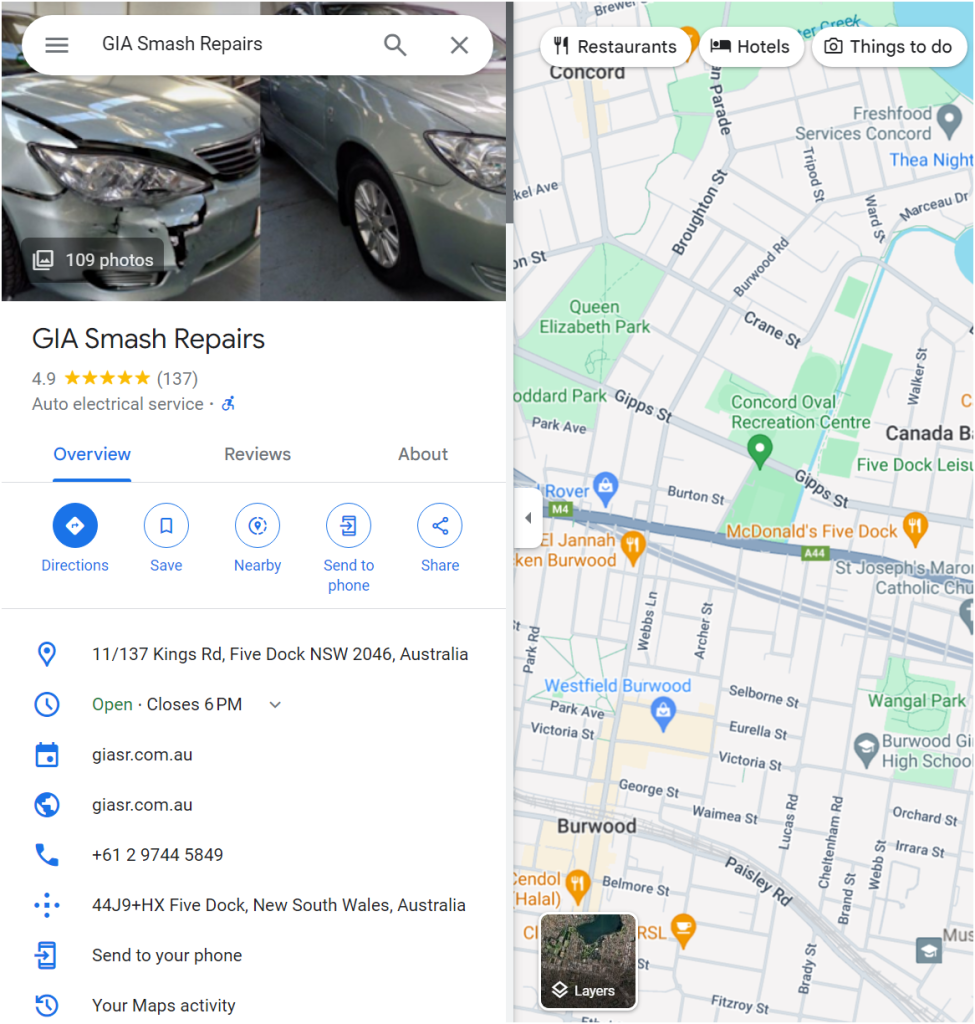
First things first, claim and optimise your Google My Business (GMB) listing. This is non-negotiable. Your Google Business profile is essentially your company’s homepage on Google.
Fill out every section. From business name, address, phone number, to your operating hours. Adding high-quality photos, updates, or unique selling propositions would be highly beneficial.
The more information you provide, the easier it is for potential customers to find (and choose) you over others.
Importantly, maximise your local citations. Ensure your business is listed in local directories (e.g., Yelp, Yellow Pages), industry-specific sites, and review platforms.
Do Keyword Research
Keyword research is hands down one of the most important aspects of SEO. It’s about discovering what your target audience is really searching for, word per word, and how you can meet those needs.
Start with the basics and think like your customer. What are the questions they’re asking? What problems or issues are they trying to solve? Use SEO tools like Google Keyword Planner or SEMrush to dig into these queries.
These tools will give you insights into search volumes, keyword difficulty, competition levels, and secondary keywords you can also optimise and rank for.
Then study your competitors. See what search queries they’re ranking for and how you can target similar terms. This does NOT mean copying them outright. It’s more on understanding the landscape and finding gaps where you can stand out.
Don’t forget about local keywords if you’re serving a specific area. Terms like ‘smash repair shop sydney’ or ‘emergency plumber near me’ can drive highly targeted traffic.
Integrate these keywords into your website pages, blog content, and guest posts for backlinks (more on this later).
This way, you’re not simply attracting visitors but bringing in people who are ready to buy (or hire, in the case of plumbers or electricians).
| Keyword research isn’t a one-off task. Keep revisiting and updating your keyword strategy based on performance and changing trends. Ensure you’re always aligned with what your audience is searching for to stay relevant and competitive. |
Create High-Quality Content
In 2023, 2024, and beyond, content remains king.
But most of all, it’s high-quality, relevant content that will help you attract, convert, and retain customers.
The first important step to content creation? Understanding your audience.
Create an ideal buyer persona and know their pain points, interests, what they’re searching for online, or even what keeps them up at night.
Use this insight to create content that provides real value, satisfies specific search intent, and hits the right writing style, tone, and language. Your goal is to solve problems, answer questions, and offer solutions that your target market is actively seeking.
Also, focus on creating content that’s well-researched and comprehensive. Skimping on quality is a no-go. Ensure your content is thorough, accurate, and up-to-date. Use credible sources and back up your claims with data and real-world examples.
The web is already oversaturated with the same types of content. Your audiences need and deserve something new and fresh.
This not only boosts your credibility but also encourages other sites to link to your shareable content, improving your SEO.
BEST PRACTICE: Readability is very important. Use a clear structure with headings, subheadings, and bullet points. Keep your paragraphs/sentences short and straight to the point. And ALWAYS proofread. Spelling and grammar mistakes can turn off readers and make your site look unprofessional.
Enhance User Experience
Many businesses (or agencies handling their search marketing campaigns) commit the common SEO mistake of focusing primarily on keywords and backlinks, under-prioritising an indispensable ranking factor: user experience (UX).
Not needless to say, Google’s algorithms are getting smarter than ever. They’re rewarding websites that offer an exceptional experience to users browsing through them.
To succeed on your technical SEO efforts, address the following immediately:
Pagespeed
Your website needs to be lightning-quick. Or at least fast enough that it will not prompt users to click away, irritated by more than a few seconds of unnecessary page delay.
It’s the age of instant gratification and short attention spans.
If your site takes ages to load, visitors will bounce, and Google will take notice.
Use tools like Google PageSpeed Insights to identify and rectify issues that are slowing you down.
Compress too-large images, implement browser caching, and minimise JavaScript. Every millisecond counts in keeping users engaged and on your site.
Mobile optimisation
With a majority of digital shoppers browsing on their phones over desktops, a mobile-friendly site matters big time.
Make sure your website is responsive. Meaning it adjusts seamlessly to different screen sizes, whether visitors are on a desktop, tablet, or smartphone.
Site navigation
Your website should be easy to explore. With a logical structure that helps users find what they’re looking for without scratching their heads in frustration.
Use clear menus, a search bar, and well-labelled categories. You want to make the user journey as straightforward as possible by reducing the number of clicks (as needed) to reach key information or products.
Visual appeal matters too. A clean, uncluttered design with plenty of white space makes your content more readable and your site more inviting. Aesthetics should never come at the expense of functionality. Prioritise usability over fancy graphics.
Enhancing on-page experience involves making your site a breeze and a pleasure to visit. When users are happy and are not inconvenienced by onsite issues, they stay longer, explore more, and are more likely to take a desired action.
Build Backlinks
Backlinks are essentially ‘votes’ from other websites to your own website, signalling to Google that your site is credible and authoritative as so ‘voted.’ But not all backlinks are the same.
Here’s how you can build high-quality backlinks that truly make an impact.
Create link-worthy content
First, focus on crafting link-worthy content. This means producing high-quality, shareable, and valuable articles that others naturally want to link to.
Think: comprehensive guides, original research, compelling infographics, and engaging blog posts. The more useful and unique your content is, the more likely it is to attract backlinks.
Reach out manually
As much as you want to attract natural backlinks, manually reaching out to other websites with high domain authority (DA) is also key.
Don’t just sit back and wait for the links to roll in. Actively seek them out. Reach out to industry influencers, bloggers, and authoritative sites within your niche.
Personalised emails explaining why your content would be valuable to their audience can go a long way. Build relationships, not just links.
Guest-blog for reputable sites
Write articles for reliable sites within your industry. Aside from earning you a backlink, it exposes you to a broader audience. Make sure your guest posts are high-quality and deliver genuine value to the readers of the host site.
Other link building tactics you can leverage is reaching out to site owners with broken links found on their site. Then suggest your content as a worthy replacement.
It’s a win-win partnership wherein you helped them fix a broken link and they reward you a backlink for it.
TAKEAWAY: It’s quality >>> quantity when it comes to link building. Focus on securing links from relevant sites rather than chasing sheer numbers. Over time, these high-quality backlinks will boost your site’s authority, steer more traffic, and improve your search rankings.
Optimise On-Page Elements
Going hand in hand with quality content creation is optimising its on-page SEO elements. These include your title tags, headings, internal links, etc.
Let’s go on each important onsite SEO element below:
Title tags
Start with your title tags. This is one of the first things both users and Google see. Make sure each page has a unique, descriptive title that includes your primary keyword.
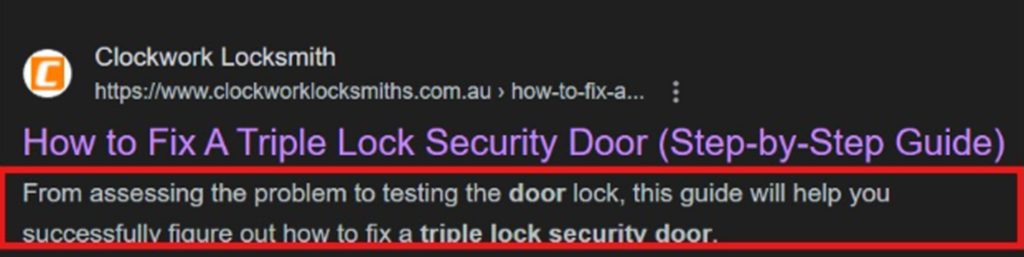
Keep it under 60 characters to ensure it displays properly in search results. A strategically crafted title tag can increase your click-through rate (CTR).
Meta description
Partnering your title tag is a fitting meta description. Though they don’t directly impact your SEO, they play a crucial role in CTR.
Write compelling and concise meta descriptions that accurately summarise the content of the page and include relevant keywords. Aim for around 150-160 characters to ensure it’s fully visible in search results.
I recommend using Rank Math’s meta tag analyser. The tool measures pixels rather than the number of characters.
That is because 150 characters may fit in desktop screens but not in mobile. It will tell you whether or not your title and meta descriptions exceed the maximum length.
Headings
Proceed on your headers (H1, H2, H3, etc.). Proper use of header tags helps structure your content for readers and makes it easier for web indexers to understand your page’s hierarchy.
Your H1 tag should include your main keyword and clearly convey the topic of the page. Use H2 and H3 tags for subtopics or sections.
Primary and secondary keywords
This is where you apply best practices after doing keyword research.
Ensure your content is value-packed and relevant to your intended audience. Use your primary and secondary keywords naturally throughout the text.
Avoid keyword stuffing, or unnecessarily mentioning target keywords as many times you please to gain an unfair SEO advantage. Include synonyms and related terms to enhance context and make your content smooth to read.
Images
Use high-reso photos with descriptive, keyword-rich file names and alternative text. It helps improve accessibility for users who purely rely on screen readers.
However, make sure to compress said images to reduce load times. You can add quality photos without making your site sluggish and unresponsive.
Internal links
As opposed to backlinks, these are links from one page on your website to another page on the same site. They help users navigate your pages and enable search bots to understand the structure and hierarchy of your content.
Use internal links to guide visitors to related content they may be curious to know more about. It’s one way to improve user experience and also help distribute page authority throughout your site.
For example, if you have a blog post about SEO tips, link to other relevant articles or services you offer. It encourages readers to explore more of your content and gestures to search engines that your site has valuable, interconnected information.
Focus on Long-Tail Keywords
It’s easy to get caught up chasing high-volume keywords. But long-tail keywords are a real game-changer.
These are longer, more specific phrases that may have lower search volumes but bring in highly targeted traffic. Two main things why this keyword strategy works:
Less competitive: Major industry players often dominate the high-volume keywords. This is tough for small businesses to rank for. With long-tail search terms, you’re competing in a less crowded space, increasing your odds of ranking better, and attracting more niche audiences.
For instance, instead of targeting just ‘electricians,’ go for ‘residential electrician [your suburb and/or city].’ Specificity helps you connect with users who are closer to making a purchasing decision.
Higher intent: When users search for specific phrases, they’re usually further along in their buying journey and in your sales funnel. They’re past the casually browsing stage. They’re ready to take action.
This means the traffic you attract through long-tail keywords is likely to result in conversion (whether that’s getting them to subscribe to your newsletter or buy from your ecommerce store).
PRO TIP: Integrate these keywords naturally into your content. Correct the grammar if it’s incorrect. Use them in blog posts, FAQ sections, and product descriptions.
Engage with Customer Reviews
The SEO value of customer reviews is often overlooked, even doubted.
But yes, having reviews published on your site builds trust with your audience. It communicates to Google that your business is legit, actively operating, and above all, values customer feedback.
What you should do: encourage your customers to leave reviews.
The more reviews you have, the more credible your business appears to potential customers and search engine bots. How to do it?
By sending follow-up emails after a purchase, including review links in your communications, and simply making it easy for customers to share their experiences. Positive reviews can improve your local search presence and attract more traffic.
You can also use your latest client reviews as a source of fresh content. Highlight positive reviews on your website and social media. This serves as your social proof and makes your content more dynamic and relevant.
Don’t forget about third-party review sites like Yelp and industry-specific platforms. Ensure your business profile is complete and up-to-date on these sites. Regularly monitor and engage with reviews here to maintain a positive online reputation and boost your visibility in local SERPs.
PRO TIP: Respond to reviews even if, or especially if, they’re negative. It shows you’re quick to address their complaints in a professional and timely manner, and that you actually value your customers’ opinions and are committed to improving your services.
Include schema markup
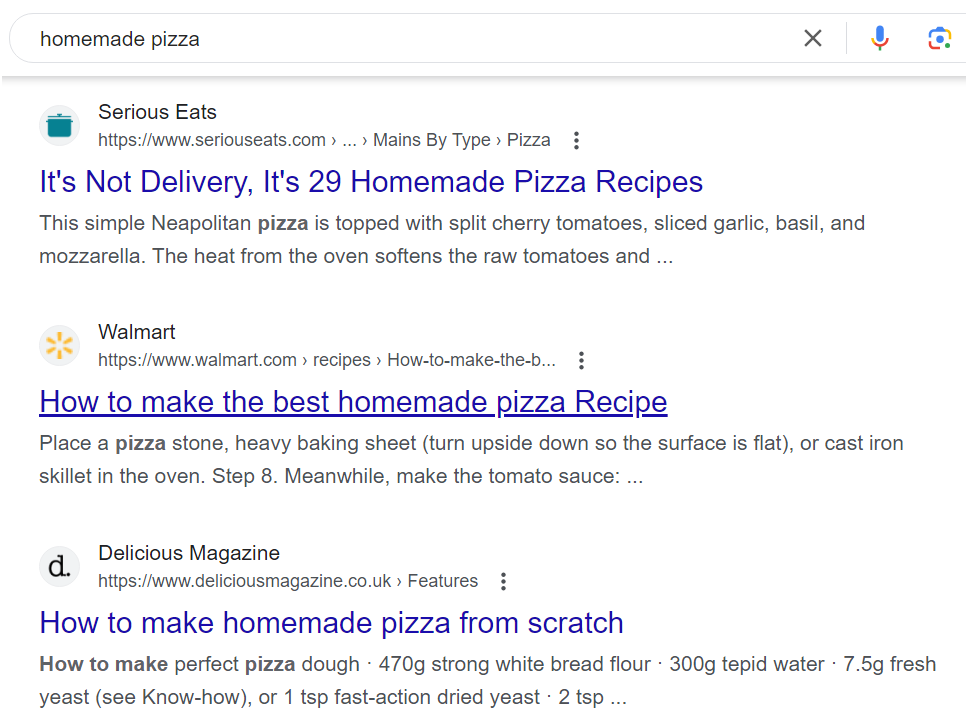
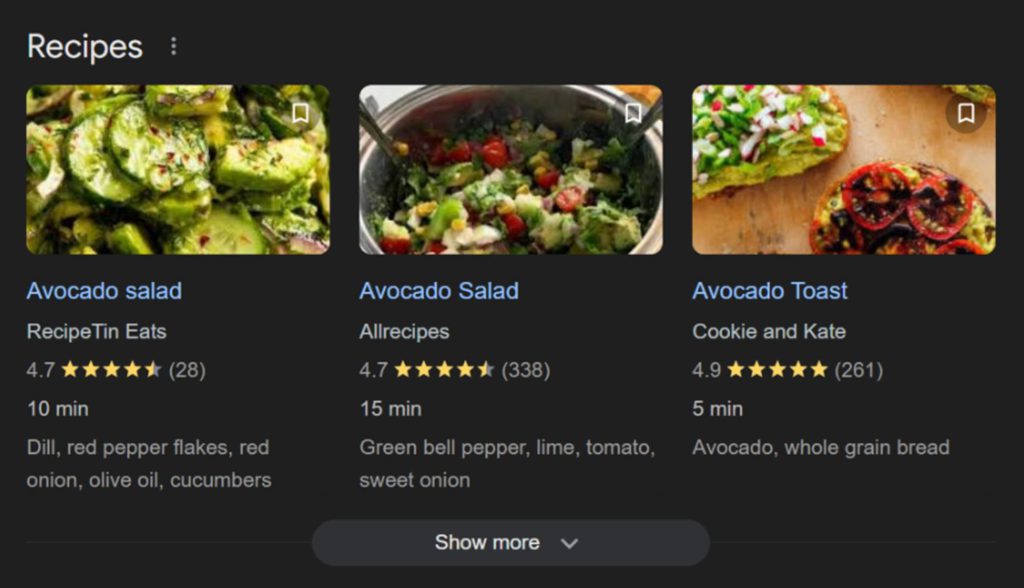
Enhance how your pages appear in search results by adding structured data or schema markup to your code. This means richer, more informative search listings that can boost your click-throughs.
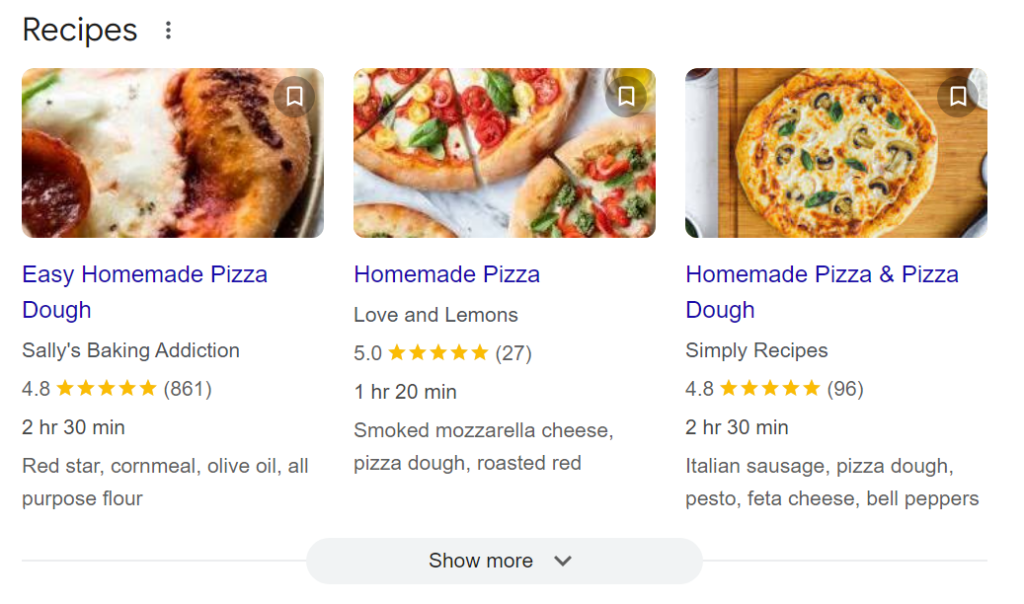
Practically, schema markups enable rich snippets—extra bits of information such as star ratings, prices, ingredients and cook times for recipes, or event dates—to appear alongside your search listings.
These snippets are proven attention grabbers and provide users with valuable information upfront, making them more likely to click through to your site.
For example, a recipe with a rating and cooking time displayed directly in the search results is more appealing.
Now compare that to this plain link:
Which listing format captures your attention more, and which results are you less likely to click on?
To be clear, adding structured data does not directly impact your SERP rankings.
But the benefit is just as advantageous, if not more: aside from letting Google understand your content better, it also increases the noticeability of your page compared to your competitor pages for a particular query.
The search term ‘homemade pizza’ above is a case in point.
In addition to that, many sites don’t seem to be keen on utilising these markups as a part of their on-page SEO tactics yet. Get ahead by adding one to your code in order to generate more clicks for your site, especially for commercial and transactional terms.
Monitor and Analyse Performance
The worst thing you can do with SEO is to put it on autopilot. SEO is an ongoing process that requires constant monitoring and analysis. To truly succeed, you need to keep a vigilant eye on your performance stats and make data-driven adjustments out of it.
Here are some best practices:
Set up analytics tools
If you haven’t yet, make sure to set up Google Analytics and Google Search Console. These free tools provide practicable insights into your website’s health and performance.
Google Analytics, for one, helps you understand where your traffic is coming from, which pages are receiving more views and visits, and how visitors are interacting with your site.
Google Search Console gives you detailed information about your search traffic, indexing status, and any technical and non-technical issues that might be jeopardising your SEO results.
Perform a link gap analysis
Do you have toxic backlinks considered spammy or low-quality by Google? Use link audit tools to monitor your link profile. You can also utilise them to look for new link opportunities, check their quality, and ensure they’re from sites with a high DA.
Track user behaviour metrics
Bounce rates, average session duration, and pages per session are all critical metrics to measure user behaviour, which you can use to make needed strategy adjustments.
For example, high bounce rates or short session durations might indicate issues with your content or UX (e.g., slow page loading times). Use this data to identify problem areas and make improvements to keep visitors engaged.
Conduct competitive analysis
Keep your competition closer. Spy on their page-1 positions, content strategies, and link profiles. Understanding what’s working for them can provide you with workable insights and help you stay ahead in the digital marketing arena.
Review keyword performance
Regularly audit your keyword performance. Track which keywords are driving traffic to your site and monitor their positions in search engine results pages. If certain keywords are underperforming, consider updating your content or trying new variations.
Conversely, if some keywords are doing well, double down on them to maximise their impact.
Grow Your Small Business With Domain Bird’s SEO Experts
Looking for a digital marketing partner specialising in SEO services for small businesses in Australia? Domain Bird is a results-focused SEO agency helping small and growing Australian brands since 2013.
We both work with tradies and corporate professionals who are wanting to achieve long-term and more sustainable growth at cost-effective prices. That’s Domain Bird for you.
To get started, grab your FREE site audit and schedule a consultation where we discuss your challenges, objectives, and how our small business SEO company can go about helping you hit them with a
Working with a trusted full service digital marketing agency Australia has to give can help you hit your two main targets: getting your business found online and increasing your profitability.
Get in touch with us. We’ll tell you how it’s done.
Search engine optimisation is multifaceted. So much so that even experienced marketing professionals commit common SEO mistakes that threaten to undermine their SEO campaign performance.
Not needless to say, these mistakes can be corrected to help you get back on track.
Here, we give you a rundown of 15 common SEO issues and provide workable solutions on how to fix them.
Key Takeaways
Effective Keyword Research: Conducting thorough keyword research is crucial for visibility. Avoid keyword stuffing and ensure content aligns with user search intent to enhance engagement and rankings.
Address Duplicate Content: Duplicate content can confuse search engines and negatively impact rankings. Use site audits and canonical tags to manage duplicates effectively.
Prioritize User Experience: Factors like page speed and mobile optimization significantly influence SEO performance. Fast-loading, mobile-friendly sites improve user satisfaction and conversion rates.
Continuous Optimization: SEO is an ongoing process that requires regular updates and adjustments. Stay informed about algorithm changes and competitor strategies to maintain and improve rankings.
Most Common SEO Mistakes to Avoid & Fix
These 15 common mistakes in SEO are as follows:
Neglecting Keyword Research
Keywords are an integral part of SEO. Failing to conduct proper research on the right keywords relevant to your business and industry is a step in the wrong direction.
It’s no use crafting a well-written blog post or webpage if it doesn’t incorporate the exact keywords and variations your target audience uses to find information online.
There’s a good chance your content will not even be visible in search results, let alone reach your intended users.
You need to know what terms and phrases your potential visitors are using. What questions they’re asking. And what problems they’re trying to solve. This will allow you to tailor your content to precisely match their intents and purposes.
What you can do:
Utilise keyword research tools: Google Keyword Planner is a free tool to get you started. But consider paid KR tools with advanced features like Ahrefs or SEMrush. Grab their free trial offers to help you decide.
Explore long-tail keywords. Broad keywords with 1-2 words are very challenging to rank for. Target long-tail keywords (3-5 words). They’re more specific with lower competition and attract targeted traffic.
Analyse competitor keywords. Study what keywords your competitors are ranking for. Identify opportunities to target similar or related keywords.
Keyword Stuffing
One of the most common mistakes to avoid is unnaturally inserting keywords in one single paragraph, meta description, anchor links, and even URLs.
This spammy SEO tactic actually worked well in the past when search engines like Google were still less developed than it is today.
Now it’s widely considered a dirty, black-hat mistake in SEO to avoid at all costs.
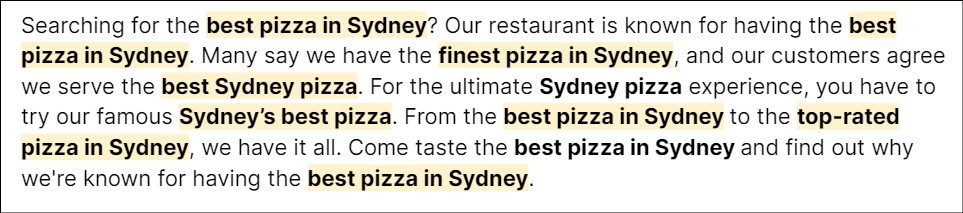
The paragraph below is an example of keyword stuffing, where the main keyword ‘best pizza in Sydney’ was mentioned multiple times in the same paragraph, along with its variations.
Best practices vs keyword stuffing:
Use secondary phrases to avoid repetitions of the main target keyword (for the topic ‘how to start a blog,’ use ‘blogging for beginners’ and ‘blogging tips’).
Don’t force grammatically incorrect search terms into your content (e.g. ‘athletic runners men’ should be corrected as ‘athletic runners for men’).
Avoid writing an unrelated subtopic just to hypertarget a keyword.
Leverage synonyms for overused terms (write ‘fitness gear’ to avoid overusing ‘workout equipment’).
Utilise main and related keywords naturally throughout. Ensure they are not used or mentioned closely together in the text.
Ignoring Search Intent
Search or user intent is the goal behind every query entered on Google or Bing search. You will NOT rank for a keyword if your content does not correspond to its search intent.
The four main types of intents include:
Navigational – users aim to reach a specific website or page. Already know what they’re looking for and want to go directly there (‘gmail login’).
Informational – seeking to gain more knowledge or understanding about a topic (‘meditation benefits’).
Commercial – comparing products or services and seeking information to aid in making a purchase decision (‘best smartphones 2024’).
Transactional – ready to take a specific action, often related to making a purchase (‘buy iPhone 15 pro max online’).
Case in point:
If consumers are wanting to get advice or features to look for in a smartphone’s camera, you can write an informative blog aptly titled ‘How to Choose the Best Smartphone Camera.’
And NOT ‘Top Smartphone Cameras for Stunning Photography,’ which has a commercial intent.
Duplicate Content
Duplicate contents are two or more articles or web pages that are significantly or entirely alike.
They can be published within the same website. Or one of them is posted in a different digital channel.
Nevertheless, having similar content will hurt your SEO value, as Google will be confused which one to rank on SERPs.
If it can’t determine which type of content is original, neither pages will rank, directly impacting your SEO rankings.
To rectify this, run a site audit to spot duplicate pages on your site.
Another fix is using canonical tags to communicate to search engine bots which content you want them to index and prefer to display on organic search.
Another way is by implementing 301 redirects where, as the term implies, it redirects users from one URL to the preferred one. This is especially suitable if you changed one of your page’s URLs.
Focusing on Quantity vs Quality in Backlinks
This is not to say it’s bad to have many backlinks for your off-page SEO efforts.
However, they must be high-quality and earned ethically from reputable sources and websites within the same industry or niche.
Fewer but high-quality backlinks > more but low-quality inbound links
With the latter, Google may be getting the impression that you’re buying links, which is a violation of its spam policies.
Google can detect bought links by looking through its patterns. For example, backlinks with the excessive use of transactional anchor texts (e.g., ‘buy high-quality wireless headphone’) can raise suspicions.
Focus on creating content on your site that will naturally attract links because of its quality and relevancy.
These are hyperlinks that connect one page of your website to another. They help search engines understand the structure of your site much better.
Most importantly, they aid your visitors in finding other relevant content from your site that they may be interested in reading further.
Your pages with little to no internal links signal to search bots that they may not be that important after all.
Skipping internal linking is a missed opportunity and yet another SEO mistake to avoid.
BEST PRACTICE: Include relevant links to every new content, ideally 2-4 internal links. Make sure the anchor texts are descriptive and provide context to what the linked page is about.
Not Fixing Slow Pages
User experience, which pagespeed falls under, is a key metric Google analyses as one of its SEO ranking factors.
Slow loading pages will have a negative impact on both your search rankings and sales. Users tend to click away if a web page is taking more time than normal to load.
Meanwhile, more than 80% of marketers admit that pagespeed does impact their conversion rates.
This makes it very important to prioritise resolving these common technical SEO issues to reduce bounce rates as a result of sluggish pagespeed.
Run Google Pagespeed Insights and improve your UX score with the following technical SEO best practices:
Browser HTTP caching
Compressing files or images
Reducing CSS and JavaScript files
Limiting redirects
Local SEO Under-Optimisation
Some people make the mistake of fixating on one aspect of their SEO campaign and forgetting that there are other SEO challenges that need to be equally prioritised.
Local SEO is one of them. If you own and manage a local business, whether it’s a dental clinic in Parramatta or a smash repair shop in the Eastern Suburbs, optimising for local search is crucial to attract nearby customers.
Failing to do so and you’re missing out on buy-ready customers within the community.
Optimise your website for local SEO by nurturing your Google My Business profile.
Which includes getting relevant local citations, soliciting and responding to customer reviews (positive or negative), and posting business updates periodically.
Failure to Optimise for Mobile
Google implemented a mobile-first indexing approach in 2016. Knowing nearly 96% of online consumers use a mobile device to access the internet (Statistica).
This essentially means the world’s largest search engine primarily uses mobile to index and rank websites. NOT optimising for mobile is almost a surefire way to compromise your ranking potential.
Use Google’s free mobile-usability test to check whether or not your site is responsive for mobile devices.
Improve your website’s mobile-friendliness by:
Including high-resolution images – low reso and very small images are unattractive and may prompt users to click away.
PRO TIP: Test it on your own mobile device. Put yourself in the shoes of an actual visitor and click on every button, determine if it loads fast enough, and take note of technical issues to fix immediately.
Spamming Structured Data
Schema markups or structured data enable your content to show up on organic search in a rich format. It could greatly help in increasing your click-through rates.
However, some misuses this feature by marking up irrelevant, unrelated, and misleading content – aimed at increasing their search engine rankings, in a manipulative way.
Avoid this mistake by using the right schema markup (e.g., if you own an ecommerce site use the Product schema, not the Restaurant or Local Business schema).
Don’t mark up content invisible to your readers. And comply with Google’s spam policies for web searches.
Unnecessarily Long Content
While there is some truth to claims that search engines like Google favour long-form content, this may not be the case for whom your blogs and articles are intended:
Unless it’s an in-depth guide that justifies having a longer piece to cover all [sub]topics, you can safely assume users don’t really like reading long articles.
They simply don’t have the time, interest, or attention span.
Write a longer piece only when necessary. Such as explaining a complex legal process or comparing multiple software solutions.
But for straightforward topics like ‘how to boil an egg,’ it doesn’t make sense writing a 2,000-word essay on it. Your readers just need concise steps.
A short, punchy guide that gets to the point can often satisfy the reader’s needs and rank well in search engines.
PRO TIP: Match the length of your content to the complexity of the topic and the needs of your audience. Sometimes brevity is best. Other times, a deep dive is exactly what’s needed to rank page-1 on Google search and provide real value to your readers.
Un-Optimised Page Title and Meta Description
Your meta title and description are what users first see on the search results.
They need to be clear, compelling, and relevant to what they’re searching for. Using generic titles and descriptions can cost you clicks and visitors.
The most common SEO errors involving these tags are they’re either too short, too long, or empty.
The ideal length for page titles are 60 characters max (520 pixels), and up to 155 characters (920 pixels) for meta descriptions.
But more importantly, both should include the main target keyword and concisely explain what readers can expect when they open the webpage, encouraging a click-through.
Alt Tags Missing
Alt (alternative) tags or alt texts describe the content of an image if it fails to load in a webpage.
It’s chiefly a matter of accessibility, as including one benefits visually challenged individuals who rely on screen readers to understand what an image is about.
SEO-wise, including one will help you rank higher on Google image search.
Though missing or skipping alt texts may not be considered a major issue, it’s a sneaky SEO mistake that still needs to be fixed.
Take an extra minute to add a descriptive alt text. It’s a small boost that can make a big difference in your overall SEO performance.
Writing for Search Engines First
It’s when you craft a strategy that’s primarily programmed to ‘please’ search engines rather than humans.
It happens when you have to resort to some of the abovementioned spammy SEO tactics, such as keyword stuffing and unnecessarily prolonging a blog’s word count.
Always prioritise your human readers first and search engine bots second. Ensure this through the following:
Focus on high-quality content creation: Create valuable, informative, and engaging content that answers your audience’s questions and meets their needs.
Use natural language: Write in a more conversational tone. Avoid keyword stuffing at all costs. Keywords should flow naturally within the content.
Prioritise readability: Use short sentences and paragraphs, subheadings, bullet points, and clear language. Make your content easy to read and understand.
Address user intent: Understand and address the purpose behind every user’s search query. Provide comprehensive and relevant information.
Include visuals and media: Enhance your content with images, videos, and infographics. Aim to deliver additional value and keep readers engaged.
Failing to Make Continuous Adjustments as Needed
SEO is never a one-and-done, band-aid solution to any online marketing challenges. Rankings can be long-term but not permanent.
One of the biggest SEO mistakes you can make is setting your strategy on autopilot and altogether forgetting about it.
Ignoring the need to make needed adjustments can leave your site stuck and lagging behind your top-performing competitors.
Why the need to make adjustments and further optimisations? Two things mainly:
(1) Search engine algorithms constantly change, and (2) new competitors emerge, keen to knock you out of the SERPs with their fresh digital marketing strategies.
Do not let these common errors cost you hard-earned SEO traffic.
Stay on top by:
Keeping a vigilant eye on your website’s performance stats. Use SEO tools like Google Analytics and Google Search Console. Identify areas you need to be working more on.
Following SEO news and subscribing to newsletters from the industry’s trusted voices. Keep pace with algorithm changes, new ranking factors, and emerging SEO practices recommended by Google.
Performing periodic audits to evaluate your site’s health. Identify and troubleshoot any issues. Ensure your SEO strategies remain current.
Regularly updating existing content on your website. Keep it relevant and in line with current search trends and user intent.
Avoid These Common SEO Pitfalls & Partner With Domain Bird
Overcome these common technical, content, off-page, and on-page SEO mistakes with professional help from a digital marketing agency. Domain Bird is a results-focused, Sydney-based search advertising company with 10+ years of experience.
Our SEO experts have helped plumbers, electricians, mechanics, accountants, lawyers, ecommerce clients, and more in making online marketing highly profitable for their businesses. We want to help yours next.
Book a consultation today and grab your FREE site audit. Supercharge your search visibility and improve your SEO performance with Domain Bird!
Working with a trusted full service digital marketing agency Australia has to give can help you hit your two main targets: getting your business found online and increasing your profitability.
Get in touch with us. We’ll tell you how it’s done.
Search engine optimisation (SEO) has been around for almost 30 years.
Fast forward to 2024, SEO remains to be one of the most preferred digital marketing strategies that continue to benefit businesses big and small in their online campaigns. But for consistent growth results, both businesses and search marketing experts need to keep pace with the latest trends in SEO. This is in order to NOT make your digital campaign any less profitable and effective than it should be.
Here, let’s explore the latest SEO trends projected to make a big impact in the way marketers approach organic search advertising in 2024 and beyond.
Is SEO still relevant in 2024?
Amid the rise of other digital marketing channels and strategies, is search engine optimisation still relevant?
The answer is a resounding yes!
It will continue to evolve with newer SEO tactics that are in line with current trends and user behaviour changes in the vast digital landscape.
SEO remains kicking and essentially not dead in 2024.
Top 10 SEO Trends in 2024 to Watch & Prioritise
From the meteoric rise of AI and machine learning to the surge of high-intent keywords, here are top 10 trends to watch out for in SEO in 2024.
SEO Trends
Description
Action/Strategy
AI-Generated Content
The rise of AI tools like ChatGPT has revolutionized content creation, making it faster but prone to producing generic, low-value content.
Leverage AI tools for speed, but add human expertise for high-quality, unique content. Use AI to assist with outlines and drafts, then refine with original insights.
High-Quality Content Creation
Human-written content remains critical, especially to counter the limitations of AI-generated material.
Focus on creating content that is original, authoritative, user-friendly, and error-free. Address search intent with relevant, well-researched information.
Topical Authority
Google prioritises websites that demonstrate expertise, authority, and trustworthiness (E-E-A-T).
Build authority by creating in-depth content on a core topic, using keyword research, topic clusters, and internal linking.
Voice & Visual Search
Increasing reliance on voice and visual searches like Google Lens for quick information retrieval.
Optimise for traditional SEO to also rank in voice search. Ensure images are mobile-friendly, with optimized file names and alt texts for visual search.
Video SEO
Video content has a strong impact on convincing users to make purchasing decisions.
Create videos and optimise them using keyword research for YouTube and other platforms. Incorporate them in your written content for better engagement and SEO.
Author & Publisher Credibility
Google is giving more weight to websites with credible authors who demonstrate proven knowledge and expertise in their fields.
Create author pages, encourage guest blogging, and collaborate with industry experts.
Content Refreshing & Updating
Google prefers updated content that reflects the most current information and user intent.
Regularly update your content with new information and refresh old articles to maintain SEO rankings.
Mobile Responsiveness
Mobile-first indexing is essential since most users browse the web via mobile devices.
Audit your site for mobile-friendliness using tools like Google Search Console and optimise page speed, content layout, and meta descriptions for mobile.
Commercial & Transactional Keywords
Google is shifting focus towards commercial and transactional intent keywords, which indicate higher buying intent.
Optimise website pages targeting high-conversion commercial and transactional keywords, adjusting existing content to focus on intent-driven searches.
Google Search Generative Experience (SGE)
SGE uses AI to generate detailed answers, snippets, and visuals, but still drives traffic to external sites.
Create in-depth, valuable content that encourages click-throughs from SGE-generated answers. Continue focusing on authority and onsite SEO practices.
Surge in AI-generated content
Since the launch of ChatGPT in November 2022 and other AI writing tools that followed suit, millions of users have taken advantage of their groundbreaking convenience.
These tools tremendously speed up content creation and make employing human writers almost needless.
But as you may already know, there’s a big catch here.
With more and more businesses and marketers relying on AI for content creation, that also means human users are being fed the same type of generic, unoriginal content that provides no real or additional value.
Not to mention AI writing assistants make mistakes.
Still, there’s no denying what AI tools can do for businesses and human writers alike.
So instead of altogether avoiding AI use or completely relying on it for generating SEO content, the trick is to leverage tools like ChatGPT with a human touch.
That is, use highly specific prompts to train the AI into crafting content that’s not overly generic. You can start by asking your AI assistant to create a detailed outline for your blog.
As the human specialist, your role is to key in a clear prompt that the AI will base its response from. For instance:
High-Quality Content Creation to Counter AI
The only way to counter and beat AI content is to create high-quality content written by a human expert.
Flesh-and-blood writers remain irreplaceable even in the threat of AI takeover.
The latter does not have intuition and cannot provide real-life experiences of which only humans are capable.
Create content that ticks all the boxes of what constitutes ‘high-quality’:
Original – unique perspectives and fresh insights, no fluff.
User-Friendly – easy to read, plain language, short sentences and paragraphs.
Authoritative and Accurate – trustworthy, error-free, and well-researched content.
Relevant and Useful – directly addresses user needs and satisfies search intent.
Greater Priority on Topical Authority
What makes a website stand out as a reliable source of information in its industry? Topical authority is key.
It’s a killer combo of Experience, Expertise, Authoritativeness, and Trustworthiness, or Google’s E-E-A-T framework for content quality assessment.
The goal of search engines has always been to provide users with the most relevant and reliable information. This makes it critical for businesses with a web presence to consistently produce high-quality, accurate, comprehensive, and authoritative content.
This 2024, there’s no room for low-quality content in any search engine results pages.
Here’s how you can establish your topical authority:
Keyword Research: More than search terms, look for topics to write about, with the main topic being the industry or niche you belong to.
Topic Clusters: Also called content clusters, these organise content into a main topic (pillar page) with related subtopics (cluster pages).
For example, for your pillar page ‘home renovation,’ some of your cluster topics would be:
‘How to Remodel Your Kitchen’
‘DIY Bathroom Renovation Tips’
‘Budget-Friendly Living Room Makeovers’
‘Choosing the Right Paint Colours for Your Home’
Comprehensive Writing: Create in-depth pieces of content that cover all relevant subtopics your target audience will be interested in reading as well.
Prioritise main pages and subcategories that are equally relevant, and which you wish to establish solid authority and expertise on.
Link Building: While creating authoritative content already suffices, you can still give your off-page SEO efforts a boost by acquiring backlinks.
PRO TIP: Internal linking is a best on-page SEO practice that’s worth prioritising. It helps guide both users and bots toward related and relevant pages, further establishing your topical authority.
Voice & Visual Search Gaining Even More Traction
When users are preoccupied and can’t use their hands to type, the Voice Search feature with Google assistants like Siri and Alexa does the job well.
If you’re wondering how to secure top positions for voice search, you simply need to rank for traditional SEO search.
Visual Search through Google Lens is another SEO trend for 2024 to keep an eye on.
With it, users can upload an image of an object or animal they’re unfamiliar with. Google will then do its magic and provide more information about it.
In order to rank high for visual SEO, first and foremost, your website needs to be mobile-friendly. It’s for the simple fact that visual searches are done via mobile.
Google ranks websites that are mobile-friendly and prioritise having great user experience. Increase your SEO ranking potential by optimising image file names alongside their alt text descriptions.
Video SEO on the Rise
The convincing power of a well-made video for businesses selling a product or service cannot be denied.
Billions of people watch videos every year, and Wyzowl’s 2024 marketing report shows that 82% of people said they were convinced to buy a product after watching a video.
Rightfully so, digital marketers are prompted to include video content in their SEO strategy to rank in search results.
So should you start leveraging video marketing if you haven’t yet? Definitely, but not without a solid strategy in place.
Before posting it on YouTube and/or as visual media accompaniment to your written content, first conduct keyword research targeting popular YouTube search terms.
You can target them in your title, main description, and tags for optimal results.
Author and Publisher Credibility More Crucial for Demonstrating Expertise
In the May 2024 Google leak, it’s found that the world’s biggest search engine does store data about publisher and author entities.
This may very well mean that Google is giving more importance to and are more likely to rank websites with credible authors. Meaning those with proven knowledge and expertise in a specific field.
Remember that authoritativeness, or a website’s credibility when it comes to providing information, is one of the influencing factors Google uses to gauge content quality and relevancy.
In order to enhance your site credibility, you can:
Create dedicated author pages on your website. Highlight their background, field(s) of expertise, and even links to their social media like LinkedIn.
Engage in guest blogging to maximise your SME’s online presence and reach. This tells Google and users that your authors are real and legit experts.
Collab with industry experts to contribute to your site. By having a recognised professional publish content on your site, it adds to your overall credibility and trustworthiness.
If hiring content writers, thoroughly check every candidate’s experience and topical expertise to ensure you’re employing only proficient content creators.
Refreshing and Updating Content is a Must
Search engines like Google DON’T like outdated content.
Rightfully, they favour articles that are up-to-date and provide real value for users reading about them.
This makes it highly necessary to update your content to maintain your search engine rankings and content relevancy.
For example, immigration policies or visa regulations in Australia constantly update.
Your migration law firm may have written a piece about a visa that is now permanently closed for new applications.
Failing to refresh your content based on this recent development may give your website a bad impression, as users rely on updated information to guide their decision-making.
However, content refreshing goes beyond simply adding updated info on an old piece or blog.
Aim to continuously satisfy user intent and other off-page and on-page SEO best practices.
Mobile Responsiveness Remains a Huge SEO Ranking Factor
Since 2016, Google has implemented a mobile-first indexing approach to gauge every website’s technical SEO performance.
Because while websites have been programmed for desktop use/users, statistics show that nearly 96% of people browse the internet through a mobile device.
As such, it’s more important than ever to prioritise your mobile pages and check for technical errors, pagespeed, and content issues.
Making your site both mobile-friendly and -responsive has always been the way to go.
Use Google Search Console to run audits on Core Web Vitals and see whether you’re satisfying Google’s key guidelines on best practices for mobile responsiveness.
PRO TIP: Use Rank Math’s meta tag analyzer to write your page title and meta description. Here you’ll know that the standard 150-160 character limit for meta descriptions is not ideal for mobile due to smaller screen size. The tool measures pixels rather than characters to ensure your meta tags will fit on both devices without being cut short.
Focus on Commercial- and Transactional-Intent Keywords
Search intent is the reason behind every user query. There are four main search intent categories, namely:
Informational: if they’re wanting to find more information about a certain topic (‘benefits of yoga’);
Navigational: if users are looking for a particular website to log on to (‘facebook login’).
Commercial: if they’re exploring or comparing brands before buying (‘smartphones with the best camera’).
Transactional: if they’re ready to buy a product or hire a professional (‘hire personal injury lawyer sydney’).
This means Google is balancing the SERP with more focus on high-intent keywords, essentially diverting from purely informational search results.
With this SEO trend of 2024, you need to adjust your current content strategy.
For one, optimise your existing website pages targeting these high-converting and hyper relevant keywords.
Google Search Generative Experience (SGE) is Transforming Search
Finally, SGE is Google’s AI-powered conversational assistant.
When you enter a query, it will provide an answer generated by AI with accompanying visuals.
Its human-like answers derive from existing content on the web and provide links to these sources.
Now you’re probably wondering that with its advent, it’s going to take away traffic from actual websites investing lots of time and money for content creation.
But SGE only provides featured snippets, additional prompts, and visuals to search queries. It still encourages users to click on the sources it is linking to for more information.
Think: actual product reviews, in-depth guides, expert roundups, etc. These and more are the types of content that generate click-throughs. Besides, Google still displays traditional results in the SERP.
So worry not and shift your focus on maintaining relevancy and authority in your content, as well as following onsite SEO elements.
Future-Proof Your SEO Marketing Campaign with Domain Bird
Trends come and go. To keep pace with these frequent fluctuations in the digital marketing space, partner with an experienced search advertising agency that can help you stay ahead with complex algorithm changes and the future of SEO.
SEO only works with the right approach. Entrust your business growth goals only with a team of SEO professionals who deliver real results.
Get in touch with us for a no-obligation strategy session and a FREE site audit!
Working with a trusted full service digital marketing agency Australia has to give can help you hit your two main targets: getting your business found online and increasing your profitability.
Get in touch with us. We’ll tell you how it’s done.
UX and UI Design Principles That Make or Break a Website
When designing websites or applications, the focus tends to be directed towards aesthetics. But while visual appearance and presentability do matter big time, it’s only one piece of the puzzle.
If you fail to take other equally important aspects of designing web pages into account, such as responsiveness and accessibility, users may just end up clicking away. Initially amazed by the visuals but ultimately unimpressed with what they experienced on-site.
Here, let’s tackle the core UX and UI principles that can take your design from just ‘okay’ to truly impactful in terms of engagement and conversions.
UX UI typographic header. App interface improvement. User interface design and user experience development. Modern technology concept. Flat vector illustration
Difference Between UI and UX Design
While they’re closely related, UI and UX designs are not the same thing.
Read on to know what each of these concepts means and how they interact to create a cohesive and engaging digital experience.
User Interface (UI)
User Interface is the space where interactions between humans and machines occur. It deals with the look, feel, and interactivity of a product. UI is the skin and bones of your visual design. It’s what users see and virtually touch.
This includes everything from typography, colour schemes, and images to buttons, icons, and layout. A well-designed UI guides the user through a product’s interface in an intuitive way. It reduces the learning curve and makes the overall experience more enjoyable.
The best UI designers know how to balance consistency and creativity while designing a website. They ensure every visual element serves a purpose while maintaining a unifying look and feel across the entire product.
User Experience (UX)
UI is about the visual and interactive aspects of a product or service. While the principles of UX design deal with the overall experience a user has when interacting with it.
UX is the journey that a user goes through when navigating your product. It’s how users feel during and after that journey.
UX encompasses the user’s first impression and how they feel about using the product over time. It involves research, user personas, journey mapping, wireframing, and usability testing. All aimed at creating a product that satisfies user needs and intent.
UX designers help make a product generally easy to use and inconvenience-free. While UI is what gets the user to the door, UX is what ensures they have a great user experience once inside.
Relationship Between UX and UI
UI and UX are not independent of each other. They are interwoven and work together to create a seamless digital experience.
UI can be interpreted as what the user sees and interacts with. While UX is everything beneath the surface that supports those interactions.
A successful digital product requires both a strong UI and a solid UX. A beautiful interface can catch a user’s eye. But without a smooth and thoughtful experience, users won’t stick around.
On the flip side, a good UX can make a product functional and incredibly easy to utilise. Without an appealing UI, however, it might fail to attract users in the first place.
UX and UI complement each other and are the dynamic duo of digital design, working hand in hand to give users the best possible online experience.
7 Core UX and UI Design Principles to Apply When Building a Website
Principle 1: User-Centred Design
A human-centred design is a UX principle that focuses on the needs, wants, and limitations of end users throughout the entire design process.
Beyond simply what looks good or what’s technically impressive, it’s most concerned about what actually works for your audience.
Begin with understanding who your users are and what they need to achieve.
Naturally, this involves conducting user research, creating audience personas, and mapping out user journeys. Put yourself in the user’s shoes by anticipating their challenges, preferences, and behaviours.
When a design system is user-centred, it’s generally effortless for users to navigate through, even for the non-tech-savvy.
This UX design principle suggests that users shouldn’t have to think too hard about how to use your product. it should just make sense.
It means creating interfaces that are familiar and predictable, reducing the cognitive load on users and making their interaction with your product as seamless as possible.
A product that adheres to UCD principles is not only more likely to satisfy users but also meet business goals. After all, happy users are more likely to convert, engage, and stay loyal to your brand.
Principle 2: Simplicity and Clarity
Less is often more when it comes to design.
The principle of simplicity and clarity emphasises creating interfaces that are straightforward. They avoid unnecessary complexity that can confuse or overwhelm users.
Simplicity doesn’t mean stripping away functionality though. It’s delivering that functionality in a clear, concise way.
Purposeful Design: A simple design is one where every element serves a purpose. Redundant buttons, links, or images only add clutter and make it harder for users to find what they’re looking for.
Focus on Essentials: Remove these distractions and focus on the essentials to make it easier for users to explore and interact with your product.
Clarity goes hand in hand with simplicity.
Plain Language: Clear design involves using plain language, intuitive icons, and consistent layouts that guide users naturally through the interface.
User Guidance: When users know exactly what to do next, they’re more likely to complete desired actions, whether that’s signing up for a newsletter, downloading an ebook, or simply finding the information they need.
Simplicity in design leads to your users being able to focus on what matters without getting bogged down by unnecessary complications.
Principle 3: Consistency
When a design is consistent, it establishes a sense of familiarity. It will be much easier for users to learn and use your product. This principle applies to everything from visual elements to interaction patterns and content.
Consistent design consists of using the same fonts, colours, and styles across all parts of your product. It also means maintaining uniformity in how users interact with different parts of the interface.
For example, if a button leads to a particular action in one part of your site, that same button should have the same function elsewhere.
Beyond the visual, it’s also about language and tone. Whether it’s the wording of a call-to-action or the tone of your error messages, maintaining a consistent voice helps build trust and reliability with your users.
When users encounter consistency in design, they feel more in control and confident in navigating your product. They don’t have to second-guess what a button does or why a particular feature is there.
It’s a sense of familiarity that breeds a more comfortable and enjoyable experience, encouraging users to engage more deeply with your product.
When applied correctly, it can make your product and brand identity more trustworthy and memorable.
Principle 4: Visual Hierarchy
Visual hierarchy is the principle that guides the way information is structured and presented on a page.
It’s when you create a clear path for the user’s eyes to follow. Or helping them understand what’s most important at a glance. Good visual hierarchy makes certain that users can quickly and easily find the information they need.
This principle relies on manipulating various design elements, namely:
Size
Larger, bolder text or images draw the eye first, indicating higher importance.
Headlines are typically larger and more prominent than body text. With it, you’re telling users the main message or what it’s about before they proceed into the details.
Colour & Contrast
High-contrast elements stand out more, while low-contrast elements recede into the background.
Using a different colour for a call-to-action button, for example, makes it more noticeable, enticing, and likely to be clicked.
Positioning
Elements placed higher on the page or aligned centrally tend to be viewed as more important.
Strategically placing and styling elements can help ‘escort’ users through the content in the order you intend. It makes sure they focus on the most crucial parts of your site first.
Principle 5: Accessibility
Accessibility is about making your website usable for as many people as possible, including people with disabilities.
It’s a key principle that’s not only ethical but a smart business move.
A website that complies with international regulations, like the Web Content Accessibility Guidelines (WCAG), is one that can be navigated and understood by everyone, regardless of their physical or cognitive abilities.
To design with accessibility in mind, you need to consider various factors:
Colour contrast – ensuring that text has enough contrast against its background makes it easy to read, especially for users who are blind.
Alt text – providing alternative text for images helps screen readers describe the content to users who are likewise visually impaired.
Keyboard navigation – some users may not be able to use a mouse. Your website should be fully navigable and easily accessible through keyboard commands.
Captions – accessibility also extends to providing transcripts or captions for video content so users who are hard of hearing can access information.
Principle 6: Feedback and Response
Feedback and response are yet another crucial principle in UI and user experience design that enable user control and freedom in their interactions.
Whenever a user takes an action—whether it’s clicking a button or submitting a request—they should receive immediate and clear feedback.
This feedback reassures the user that their action has been recognised and provides information on what happens next.
Feedback can come in many forms:
visual cues like a button changing colour
auditory signals like a notification sound
textual messages confirming a successful action
Case in Point: when a user submits a form, a confirmation message or an email notification acknowledges the submission.
Response time also plays a huge role. Users expect instant gratification in our fast-paced digital environment. Delays or unresponsiveness can lead to frustration and cart abandonment at e-commerce checkout.
Even if a process takes time, such as loading a page or processing data, providing a progress indicator keeps the user engaged and reassured that the system is working.
When things go wrong, feedback is also essential. Error messages should be clear, informative, and instructive. They should help users understand what went wrong and how to fix it.
Instead of just saying ‘Error,’ a more helpful message would be ‘Password must be at least 8 characters long.’ It’s a type of feedback that not only improves user experience but also takes the user to a desired outcome.
Principle 7: Mobile-First Design
With the number of mobile device users forecasted to reach a whopping 6 billion by 2027, mobile-first design has become a fundamental principle in modern web design and application.
This is similarly the case for search engines, where mobile-friendly sites are rewarded with higher SEO rankings.
It’s about prioritising mobile experience in your UX design process, making sure your site functions well as it should be on smaller screens before scaling up to larger ones.
But first, you need to understand the limitations and opportunities of mobile devices. Think of smaller screen sizes, touch-based navigation, and varying network speeds.
The objective is to craft a design that is fast, responsive, and easy to use on mobile devices, which can then be enhanced for desktop users.
Given the limited screen space, you need to focus on the most essential content and actions:
Remove inessential elements that could clutter the interface.
Navigation menus should ideally be condensed into ‘hamburger’ menus.
Images and videos must be optimised for faster loading.
Buttons and links should be large enough to be easily tapped with a finger.
Interactive elements should be spaced appropriately to avoid accidental clicks.
By designing chiefly for mobile users in mind, it’s a best practice that ensures your website is accessible and functional for the broadest possible audience. Especially since mobile traffic exceeds desktop traffic.
Mobile users rightfully expect fast and flawless experiences, and your best solution is making mobile-friendliness and responsiveness an absolute necessity.
Get a Website Designed and Developed by Experts
Need a professional web design agency to craft a website that does justice to your brand and company values?
Domain Bird comprises a team of web experts helping Australian businesses big and small in their digital marketing campaign, often combining web development with search engine optimisation (SEO) for peak performance.
Keen to talk? We want to know more about you and your business. Book a consultation today and let’s have a chat about your digital growth plans!
Working with a trusted full service digital marketing agency Australia has to give can help you hit your two main targets: getting your business found online and increasing your profitability.
Get in touch with us. We’ll tell you how it’s done.
If you’re just getting started with search engine optimisation (SEO), or have already soaked your feet in its waters but aren’t experiencing the results you’ve initially hoped for, you need to up your game by mastering and implementing the four pillars of SEO.
These are the key areas you need to focus on to supercharge your site’s visibility and performance.
Overview of the 4 Pillars of SEO
The four SEO pillars are:
Technical SEO
On-page SEO
Off-page SEO
Content
Each pillar plays an indispensable role in making your site attractive to both humans and search engines.
Let’s explore these four SEO pillars more in detail. Mastering them enables you to have a clear roadmap in enhancing your SEO campaign and drive more relevant and quality traffic to your website.
Let’s go!
Key Takeaways
Technical SEO is responsible for your site’s structure, security, speed, mobile responsiveness, and search-engine-friendliness.
An SEO-friendly content satisfies search intent and establishes your topical expertise through quality content creation.
On-page SEO deals with optimising content and web pages through the proper use of headings, title tags, URLs, internal links, and images.
Off-page SEO involves building your authority and strengthening online reputation by securing links that serve as endorsements to your site.
Pillar 1: Technical SEO – Backbone of Your Website’s Performance
At its core, technical SEO takes good care of back-end elements to make your website ‘crawlable’ and ‘indexable’ by search engine bots.
The technical aspects of your website structure include the following.
Site Speed
Have you ever clicked on a website that took ages to load? Annoying for sure.
Site speed is a critical ranking factor. A slow site can drive users away and hurt your overall SEO. Use tools such as Google PageSpeed Insights to identify and fix pagespeed issues.
Compressing images, browser caching, reducing redirects, and minimising CSS and JavaScript are just a few of the ways you can boost your site speed.
Mobile-Friendliness
With more than half of global web traffic coming from mobile devices, having a mobile-friendly site is a necessity.
Google’s mobile-first indexing also means it predominantly uses the mobile version of your site for ranking and indexing purposes.
This makes it highly necessary that your site is responsive and provides a smooth experience on mobile and all other devices.
UX Navigation
Your website must be easily navigable by visitors wanting to find some information or buy something. It essentially means providing a great user experience.
It involves having clear digital ‘signposts’ and a well-organised layout that guides your visitors smoothly from one section to another without getting lost or frustrated.
Also, Google and other search engines love websites that are user-friendly. If they can easily crawl your site and find all the important pages without hitting dead ends or confusing paths, it’s more likely to rank your site higher.
Use clear menus, breadcrumbs (those little links that show your path through the site), and logical page hierarchies to identify and organise related pieces of content.
Pillar 2: On-Page SEO – Optimising Your Way to the Top
On-page search engine optimization is the art (and science) of optimising individual web pages to rank higher and earn more relevant traffic.
It’s the fine-tuning process that makes your content shine and stand out in the vast sea that is the internet.
Optimising your web pages ensures they are attractive to both search engines and users. This optimisation process is crucial for improving your site’s visibility and relevance, directly impacting your rankings and user engagement.
A highly effective SEO strategy onsite comprises satisfying these core elements, namely:
Keywords
It all begins with finding the right keywords in line with your industry.
These are the terms and phrases your audience uses to search for specific information. For example, a person looking to hire an electrician in Sydney may enter ‘electrician near me’ or ‘electrician sydney’ on Google.
Note that these are actual keywords with high monthly search volume of 22,200 and 1,300, respectively (SEMrush).
Once you’re able to find the most relevant search terms your target audience uses, you can then strategically insert these keywords into every content you will create.
Remember to integrate these keywords NATURALLY into your web pages. Keyword stuffing, or over-optimising keywords by mentioning them and their variations in the same paragraph to manipulate search rankings, is a BIG NO.
Title Tags
Your title tag is the first thing users see in the search engine results. It looks like this:
It’s basically your headline. Your attention-grabber.
A good title tag includes your primary keyword, ideally placed towards the beginning. Keep it under 60 characters to ensure it displays fully in search results for both mobile and desktop users.
Meta Descriptions
Meta descriptions don’t directly impact rankings, but they do influence click-through rates.
Just like in your title tag, you should craft a persuasive meta description that includes your primary target keyword and clearly describes what users can expect from your page.
PRO TIP: Use Rank Math. It’s a free WordPress SEO meta tag analyser that helps determine whether a page title tag or a meta description fits in both desktop and mobile screens without resulting in an ellipsis (…).
Header Tags (H1, H2s, H3s)
Notably, your H1 or Heading 1 is different from the title tag, but must similarly include the main keyword as your main headline.
Header tags help make your content more structured and organised.
Use H2 and H3 tags to break down your content into digestible sections and incorporate relevant keywords naturally.
Header Tags (H1, H2s, H3s)
Notably, your H1 or Heading 1 is different from the title tag, but must similarly include the main keyword as your main headline.
Header tags help make your content more structured and organised.
Use H2 and H3 tags to break down your content into digestible sections and incorporate relevant keywords naturally.
Internal Linking
Internal links are hyperlinks that connect one page on your website to another page within the same site.
These links help search engine crawlers understand the structure of your site and distribute link equity. Importantly, they keep users engaged by guiding them to a related content that they may also be interested in reading further.
BEST PRACTICE: Use descriptive anchor text and link to relevant pages within your site to enhance user experience and boost traffic.
Images
A pure-text page is dull and boring.
Images make your content more interesting and appealing to read. However, it can slow down your site if not optimised.
As such, it’s ideal to use descriptive, keyword-rich file names and alt text for your images.
For example, a good alternative text or file name for a picture of a dog should read like this:
…instead of file-naming it simply as: dog-playing123.jpeg
In addition, it’s best to compress images to reduce file size without compromising quality.
URL Slugs
Your web address or URL should be SEO-friendly too.
It must tell both users and search engines the context of what your page or content is about.
Keep your URLs relatively short and include the main target keyword.
Structured Data Markup
Enable rich snippets of your content in search results by adding structured data or code to your website’s HTML.
Users are more likely to click on a page that features more detailed information and encourages them to read further and explore.
You can add reviews, information about your ecommerce product, or a local business markup showcasing your GMB profile for local customers to see.
Below is a good example of a schema markup, where searchers are able to see an avocado recipe with details including cook time, user ratings, and main ingredients.
Pillar 3: Off-Page SEO – Site Authority Building
Regarded by many as the hardest part of SEO, off-site SEO is the process of building your website authority and trust through activities that occur outside your own site.
These efforts help search engines perceive your site as credible and valuable, influencing your rankings.
While on-page SEO ensures your site is optimised and user-friendly, this SEO pillar builds the authority and trust needed to compete in the search engine results pages or SERPs.
Masterfully ace off-site search engine optimisation by equally prioritising its components:
Backlink Building
Backlinks, or inbound links, are links from other websites to yours. They’re a strong indicator of your site’s authority and relevance. Focus on acquiring high-quality backlinks from reputable sites.
Quality practically outweighs quantity here.
A few links from authoritative sites are far more valuable than numerous links from low-quality sites. In fact, the latter may even be viewed as spammy, irrelevant, and manipulative.
Guest blogging is among the most popular forms of link building, where you create content for a different website – in the same industry – in exchange for a link.
Other link acquisition methods you can use include:
marketing content on social media platforms
connection with influencers for brand promotion
finding broken links on other websites to offer them your content as a replacement, and requesting a link back
crafting valuable, shareable content that naturally attracts links
Local SEO
If you have a physical office and you want to attract more nearby customers or clients, local SEO helps you capture them by prioritising your local web presence.
This involves optimising your Google My Business (GMB) profile, where users can see more information about your business, such as your contact details, operating hours, and customer reviews.
Local businesses, from law firms, dental clinics, and cafés can utilise SEO to boost foot traffic and enhance their web visibility in the Local Pack.
Pillar 4: Content – The Heart of SEO
You’ve likely heard the popular phrase ‘content is king.’ In SEO, content definitely reigns supreme as it is what attracts, engages, and retains your audience while providing the value and relevance search engines look for.
Creating and optimising high-quality content is essential for building topical expertise, driving traffic, and improving search engine rankings.
Your SEO checklist for content creation shall include:
Content Strategy
The major first step to creating content that ranks and is relevant to your target audience is building a digital marketing strategy. It should align with your SEO goals and address your audience’s needs and desires.
Start by defining your target audience and understanding their pain points, interests, and search behaviours. Plan your content around these insights to ensure relevancy and better engagement.
Content Creation
Creating high-quality content comprises thorough research, clear writing, and a focus on user intent. Ensure your content is:
Original: Unique and free from plagiarism
Informative: Provides valuable information and answers user queries
Engaging: Captures and maintains the reader’s attention
Readable: Written in plain language and shorter sentences and paragraphs
Well-Structured: Organised with clear headings, subheadings, and bullet points
Content Optimisation
Crafting a well-written content that will resonate to human readers isn’t enough. You should be able to convince search engines that your content is highly relevant as well.
This is where the abovementioned on-page elements come in, where you will need to incorporate the exact keywords and their variations, use relevant title and meta tags, include appropriate images, and add internal links.
Content Distribution
Creating great content is just the beginning. Ensure you reach a much broader audience by having your contents published in different digital channels.
Aside from your own website, promote your content and attract more leads through the following:
Social Media: Share your content on platforms where your audience is active.
Email Marketing: Send your content to subscribers who have expressed interest in your product offers.
Guest Posting: Write for other reputable sites in your industry to reach a broader audience.
Content Syndication: Republish your content on platforms like Medium and LinkedIn (for B2B companies) to expand its reach.
Ace the 4 SEO Pillars With Domain Bird
Need a marketing agency to help you expertly implement the four pillars of SEO into your digital campaign?
Since 2013, Domain Bird is a results-focused SEO agency that has assisted Australian businesses big and small in boosting their online growth and profitability through organic search.
To get started, grab our free SEO audit where our top strategist takes a comprehensive checkup of your site’s health and provides savvy recommendations for your sustainable online success.
If you want not just heaps of traffic but actual leads and sales, we’re the right experts to call for professional SEO services. Get in touch with us today by calling +61 1300 783 962 or submit an enquiry through our contact form.
Working with a trusted full service digital marketing agency Australia has to give can help you hit your two main targets: getting your business found online and increasing your profitability.
Get in touch with us. We’ll tell you how it’s done.
When Google announced in the Google I/O conference about the release of Lighthouse 3.0, many are wondering about the features of this newest edition.
Overview of the 4 Pillars of SEO
In early 2018, Google released an SEO tool they call the Lighthouse. It suggests insights on how online marketers can improve the quality of the web pages. As an open-source automated tool, Google Lighthouse checks the page’s performance, accessibility and more.
Understanding How to Use Lighthouse
Using Lighthouse to audit web pages is very simple if you know how to use Chrome DevTools. All you need to do is to browse to the page with Chrome, open DevTools and then proceed to the ‘Audits’ section. By clicking the ‘Perform and audit’ will allow you to configure the audit level in accordance with your interests like performance, SEO, accessibility and more.
You will also able to see the loading and reloading of the pages which after a while will display a new window, which is the audit report.
After Lighthouse is done with the evaluation of your page, you will be provided with an audit report, which has several scores depending on the categories you have chosen when you did the audit configuration.
The Performance Score is computed from the speed test results, by comparing the speed of your website with others. If you get 100 percent that means that your tested website is faster than 98 percent or more of web pages. A score of 50 means that the page is faster than 75 percent of the web.
The other scores depend on the compliance of the page against related best practices. Although there is a ‘Best Practices’ category on your parameters, the term we use is misleading of course, as other categories are also offering best practices. The term ‘Miscellaneous’ will be more appropriate.
If you see a question mark appearing on the test result, it is more of an ‘Error’ meaning that you got this behavior when some related tests are conducted properly.
Following the scores, overview is the performance results on six metrics including tooltips for an explanation.
First ContentFul Paint: First ContentFul Paint marks the time at which the first text/image is painted.
First Meaningful Paint: First Meaningful Paint measures when the primary content of a page is visibly populated.
Speed Index: Speed Index shows how quickly the contents of a page is visibly populated.
First CPU Idle: First CPU Idle marks the first time at which the page’s main thread is quite enough to handle input.
Time to Interactive: Interactive marks the time at which the page is fully interactive.
Estimated Input Latency: the score is an estimate of how long the app takes to respond to user input, in milliseconds, during the busiest 5s window of page load. If the latency is higher than 50 ms, users may perceive your app as laggy.
Also in the report, you will find a filmstrip, which is a step by step images of the page loading. This is very useful to make sure that the pages have loaded as expected. If there are reports with discrepancies, you can confirm them using the filmstrip. However, this feature is just in its infancy. As of now, you will not be able to find out more about what is wrong. This will not be helpful when you are using Lighthouse for complicated works. If you do not have access to the page load waterfall, you will not figure out more deeply of what happened.
Following the performance review, what you will be provided is the best practices for each of the category. Although most of these tips are very technical and not very detailed in itself you will find out more when you click on the ‘Learn more’ links.
The numerous automated controls of Lighthouse is the reason why this is great audit tool. It also highlights some ‘Additional items to manually check’ which are precious reminders.
What do Lighthouse 3.0 brings to the table
Refreshed UI
The updated version of Lighthouse, which is very noticeable is the refreshed UI. The report still has the circle graphs to display the score for each of the five categories, the design is cleaner and sleeker. The metrics are also more readable, the green and orange circles located near each metric denotes whether each of them is at par for each audit criteria.
Scoring Weights for Performance Audit
In the previous version, the web page audited receives a score between 1-100 for the Performance Audit. This remains in this new version but Google Web has shifted the percentile that each score warrants. Previously, a score of 100 percent represents the top 5 percent of web pages, in Lighthouse 3.0 it represents the top 2 percent. As a consequence, the different audits that fall under Performance category have changed.
Additional Audits
There are new audits added to this new version including the First Content Ful Paint, which is the amount of time it takes for text or image content to populate on the screen. A test on whether your website’s ‘robot.txt’ file is properly formatted. For assurance that GIFs are replaced with video tags and more are also added.
Audit Changes
There are two audits have undergone a makeover in V3, and they are refreshed and renamed too. The First Interactive is changed to First CPU Idle, it bores the purpose of same-to measure when users first interact with your web page.
The second change is the Perceptual Speed Index which is now shortened to Speed Index. According to Google, the purpose of this audit is still the same as in V2. Only slight changes in the underlying metric were made.
Faster Audits
With the simulated throttling via an internal auditing engine code named ‘Lantern’ has made possible faster audits with less variance in between runs. The engine runs audits under normal network and CPU settings and estimates how long a page would take to load in a mobile environment.
The progressive approach that Google Web team has made on the improvement of the Lighthouse audit emphasizes its importance in ensuring a fast, high-performing we experience on every device. Tests like Google Lighthouse Audit is making it easier for developers to ensure that they are providing the users a consistent, high standard experiences.
Working with a trusted full service digital marketing agency Australia has to give can help you hit your two main targets: getting your business found online and increasing your profitability.
Get in touch with us. We’ll tell you how it’s done.